Replacing Your Sargon or Enco DRO Console with TouchDRO
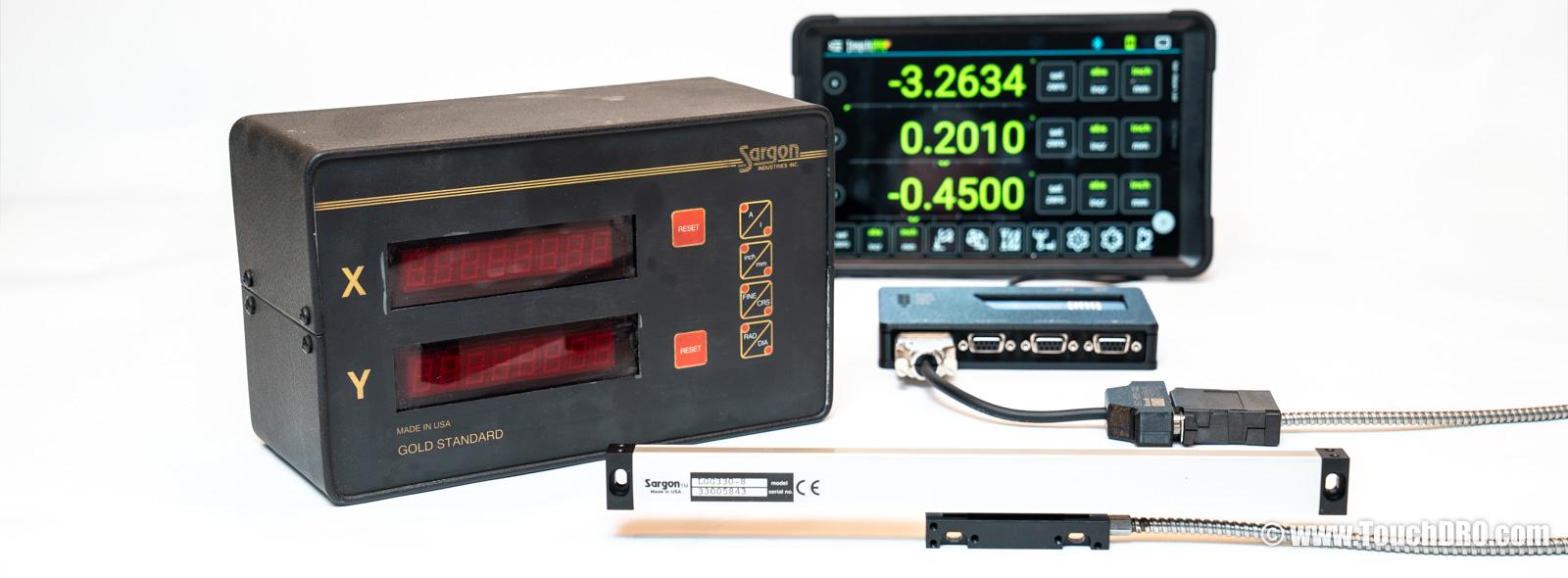
Sargon Industries built DRO systems in Southern California from the early 1980s until they closed in 2005. Their consoles (the Gold Standard, Prospector, Gold Tracer, and others) are commonly found on Bridgeport-era knee mills and clones, and were also sold under the Enco, Rutland, and Ramtek names. If your machine came with a DRO from that era, there's a decent chance it's a Sargon under the hood.
A handful of third-party shops still offer repairs, but finding parts is getting harder if not impossible. The good news is that Sargon scales are straightforward to reuse. Every Sargon scale we've come across uses a standard DB-25 connector and outputs 5V TTL quadrature, the same basic signal type used by most modern DRO systems. The TouchDRO adapter for milling machines and the adapter for metal lathes both read this signal directly; our pre-made Sargon adapter cable connects your existing scales to either one without pulling a single scale off your machine.
Why Replace Your Sargon Console with TouchDRO?
Even if your Sargon console still powers on, there are good reasons to consider a switch:
- Replacement consoles are hard to find. Sargon has been out of business for two decades, so the used units that turn up on eBay are aging boxes with no warranty and no parts pipeline behind them. TouchDRO gives you a current-production system for comparable money.
- Your scales are still good; Sargon glass scales are solidly built, and if yours track smoothly and repeat well, only the console needs to go.
- A tablet screen is far larger than the LED or LCD display on any Sargon console, so you can read your position from across the shop.
- Bolt hole patterns, tool offsets, a graphical projection view - functions the original console simply didn't offer.
- TouchDRO is actively developed, with regular firmware and app updates, and the display is a commodity part; if a tablet breaks, a replacement is $60 and an afternoon.
Identifying a Sargon (or Enco / Rutland / Ramtek) DRO
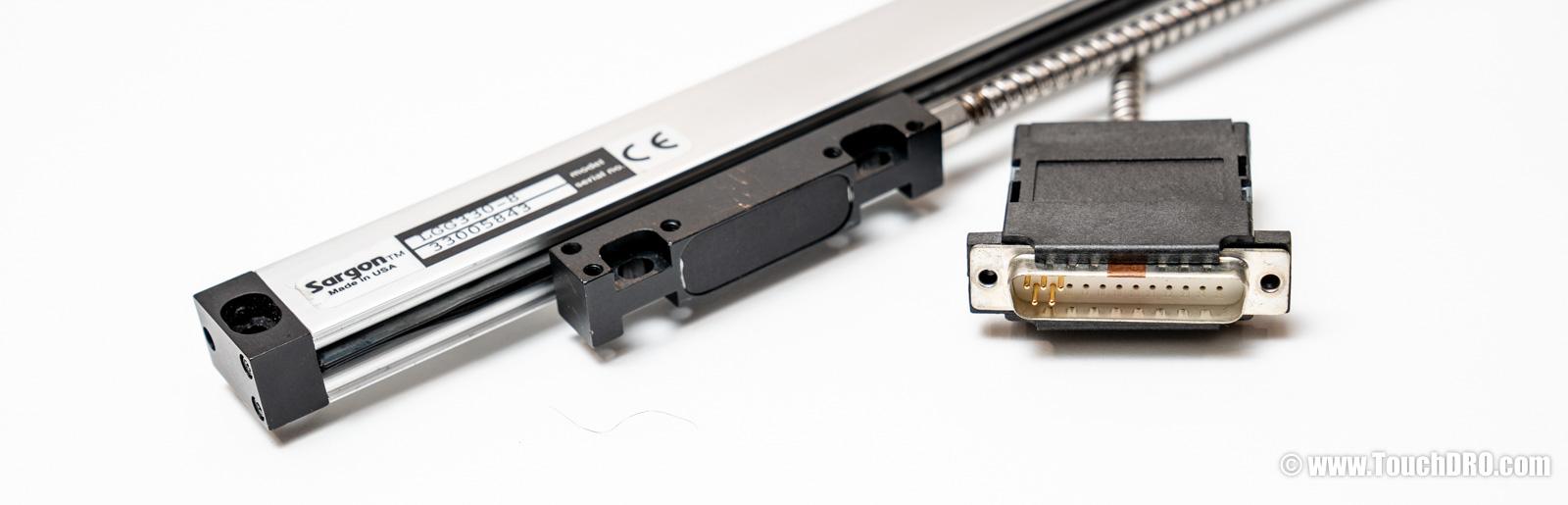
Sargon sold consoles under their own name, but they also manufactured DROs that were private-labeled by several tool distributors. If your console says Enco, Rutland, Ramtek, or Washington on the front panel and has a 25-pin connector, it's very likely a Sargon inside. (Some of these brands also sold rebranded Chinese DROs with different connectors, so the DB-25 is the tell.) The scales and connectors are the same regardless of the badge on the display.
If you're not sure, check the back of the console for a Sargon model number (typically a three-digit number like 650, 700, or 722) or look at the scale bodies for Sargon branding.
Sargon Model Overview
Sargon produced quite a few console variants during its two decades in business. The most common ones you will encounter are:
- Gold Standard (650 series) - the entry-level model with machine error compensation and absolute/incremental modes.
- Prospector (660 series) - a step up with additional measurement functions.
- Platinum Plus - commonly found on Enco-branded machines.
- Gold Tracer (700 series) - added center-finding, angle measurement, and tool offsets. Available in mill (700) and lathe (700L) versions.
- Super Platinum Edge (722) - a later Gold Tracer variant.
- Gold Tracer II (900 series) - the top of the line, with 250 program steps and 100 tool offsets. Also available in mill and lathe versions.
- Silverado, Lathe Pro, Mill Pro - later models from the membrane-faceplate and Pro Series generations.
Regardless of which Sargon model you have, every scale we've tested uses the same DB-25 connector and 5V TTL quadrature output. The console model only affects what features the display offers; it makes no difference for compatibility with TouchDRO.
The Sargon DB-25 Connector
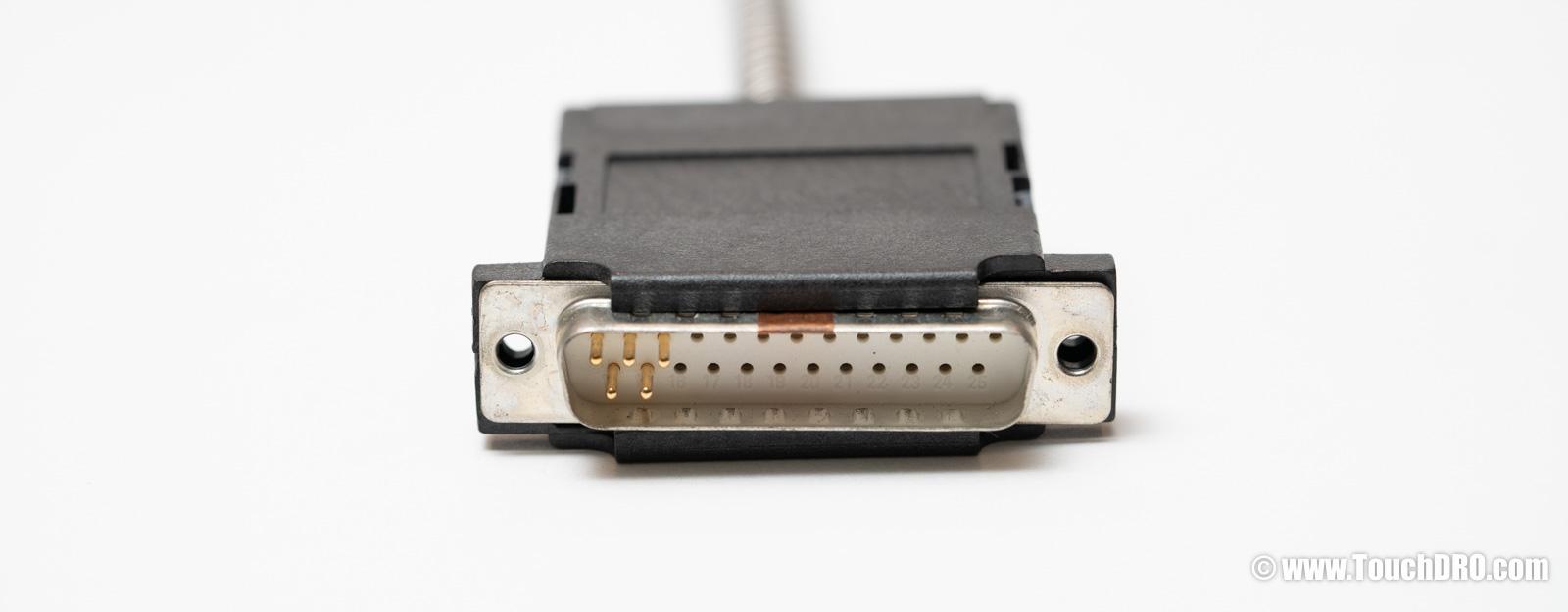
One thing that makes Sargon scales easy to work with is that every one we've tested uses a standard 25-pin D-Sub (DB-25) connector. Unlike some other vintage DRO brands that used proprietary round connectors, the DB-25 is a common, readily available connector that you can buy at any electronics supplier. We've tested scales spanning early production through the later XTG300 series, and the pinout has been consistent across all of them.
The scales output single-ended 5V TTL quadrature (channels A and B, 90° out of phase). TouchDRO can read this signal directly; the only challenge is the physical connector, since the TouchDRO uses DB-9 inputs. Here's the DB-25 pinout:
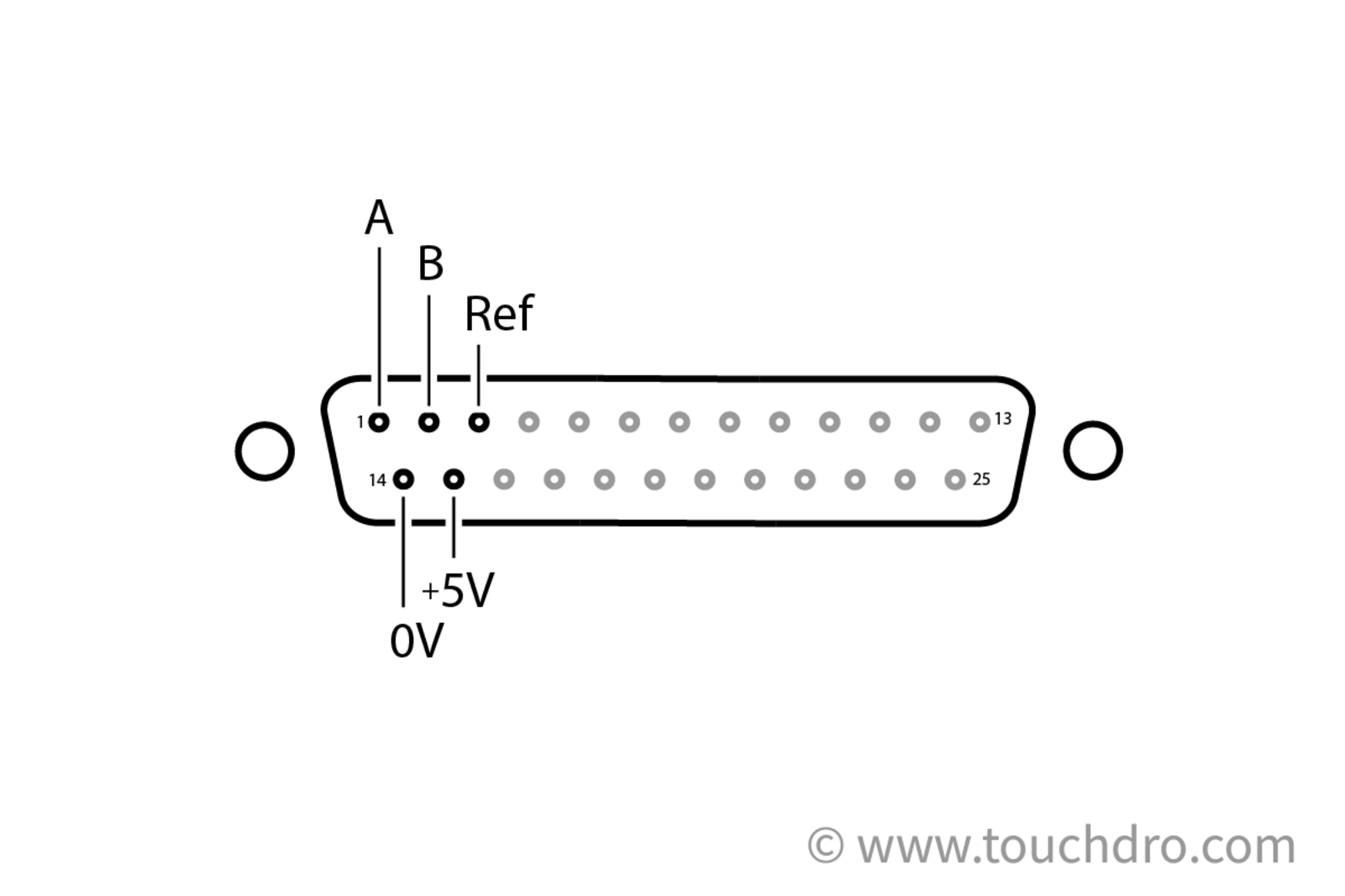
| DB-25 Pin | Signal |
|---|---|
| 1 | Channel A |
| 2 | Channel B |
| 3 | Reference (index) |
| 14 | 0V / Signal Ground |
| 15 | +5V |
All other pins on the scale's DB-25 connector are left unconnected. Older Sargon scales populate only pins 1, 2, 14, and 15 (A, B, 0V, and +5V); later production runs added the reference (index) signal on pin 3.
Adapter Cable
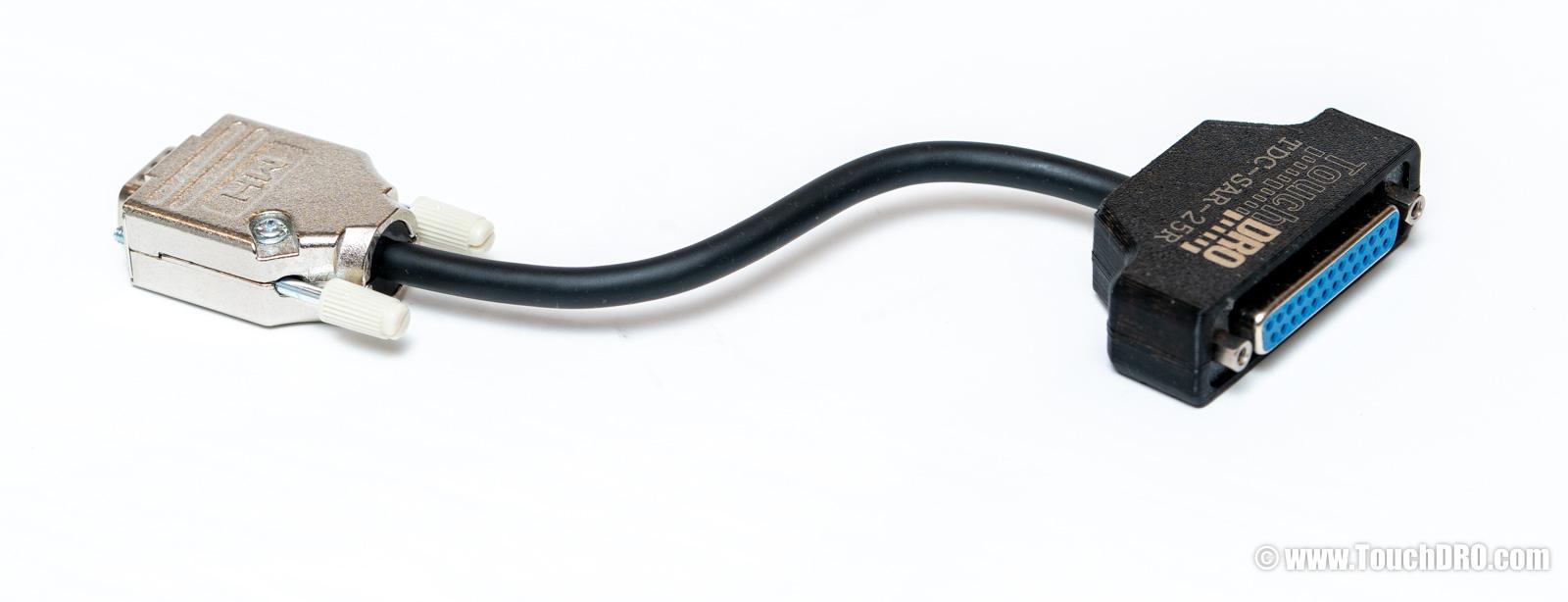
The simplest way to connect your Sargon scales to TouchDRO is with our pre-made Sargon adapter cable. It plugs directly between your existing scale cable and the TouchDRO; no soldering, no wiring.
If you'd rather build your own, you will need the following parts per scale:
- DB-25 female connector
- DB-9 male connector
- 5-conductor stranded shielded cable
Wire the populated pins on your scale over to the corresponding DB-9 inputs on TouchDRO. A, B, +5V, and 0V are all that's required for position; if your scales have the reference signal on pin 3, run it through as well.
Connector Replacement
As an alternative, you can cut off the DB-25 on the scale cable and solder a DB-9 on in its place. This eliminates the adapter cable entirely, but it's a one-way change; the scales will no longer plug into the original Sargon console. If your Sargon console is beyond repair and you have no plans to go back, this is the cleanest approach.
As with any scale rewiring, note your wire colors before desoldering anything. Sargon did not follow a universal color code across production runs, so the colors on your scales may not match someone else's.
Verify Before Powering Up
Whether you build an adapter cable or replace the connector, it's worth a quick sanity check before applying power. Use a multimeter to confirm that your +5V and 0V lines are on the correct pins and not shorted. Once powered, a logic probe or oscilloscope on the A and B lines should show them toggling as you move the scale.
Installation Overview
- Disconnect the Sargon console. Unplug the DB-25 cables from the back of the console. Leave the scales in place on your machine.
- Connect the adapter cables. Plug the DB-25 end of each adapter cable into the corresponding scale. Plug the DB-9 end into the TouchDRO's axis input.
- Mount the TouchDRO. Secure the TouchDRO somewhere convenient on your machine. A 3D-printed enclosure or a simple bracket on the column works well.
- Set up the tablet. Install the TouchDRO app on your Android or Fire tablet, pair it with the TouchDRO over Bluetooth, and configure your axes.
- Verify operation. Move each axis and confirm that the readout tracks correctly. Check direction and resolution in the TouchDRO settings.
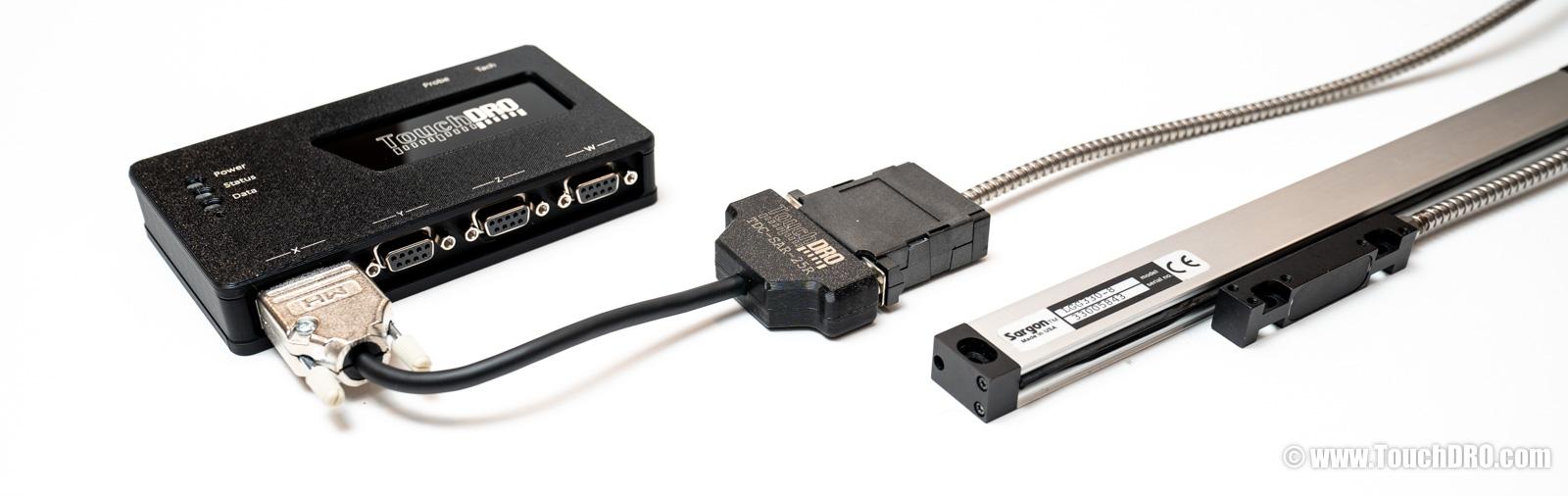
Ready to Make the Switch?
Ready to Go?
Pick up a TouchDRO adapter kit for your milling machine or lathe. Every Sargon scale we've tested is TTL-compatible, so any kit will work; you just need the Sargon adapter cable to go from DB-25 to DB-9.
Questions?
If you're not sure whether your scales are Sargon, or if you have questions about wiring, feel free to contact us directly.