
TouchDRO TDA-410/420 Adapter Manual
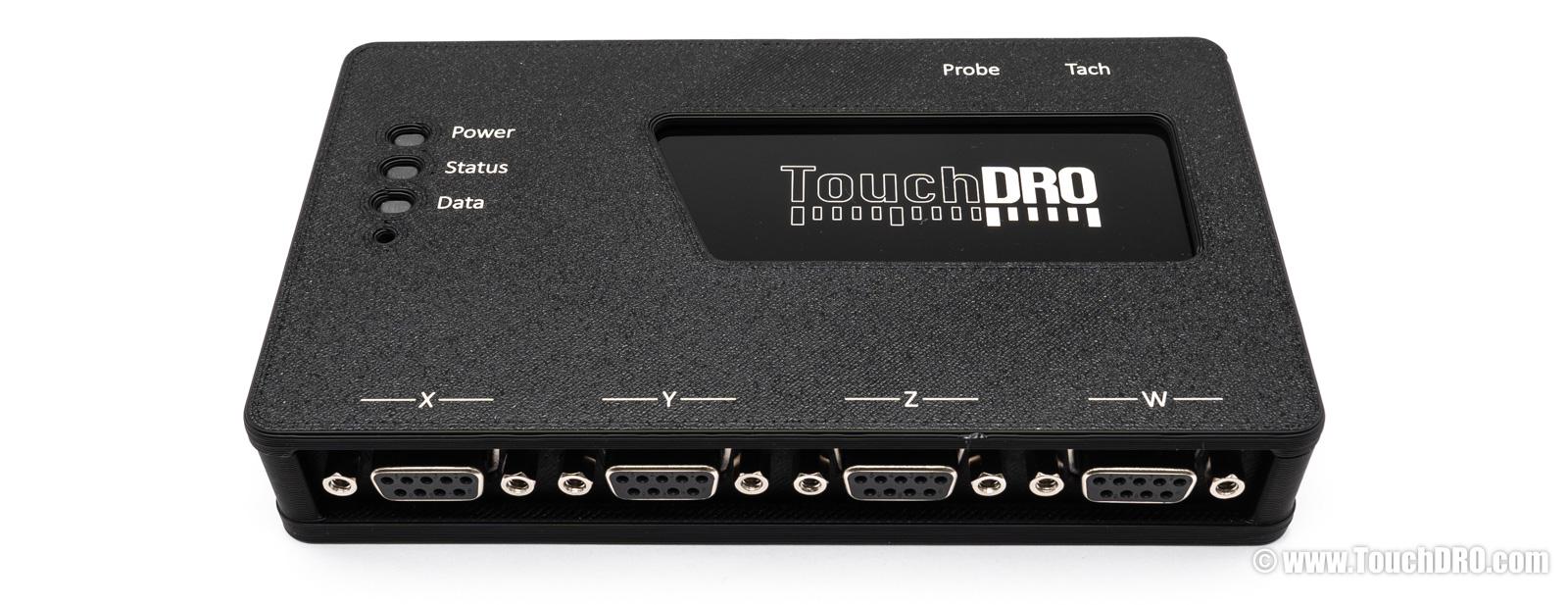
TouchDRO TDA-410 and TDA-420 are DRO scale interfaces built around the same 32-bit dual-core processor and firmware. Both support four RS-422/TTL scale inputs, Bluetooth and USB connectivity, position retention during power loss, and over-the-air firmware updates, and include a TouchDRO Plus license. They are covered by a 5-year warranty.
- TDA-410 — four scale inputs and a tachometer input; suitable for lathes and milling machines.
- TDA-420 — all of the above, plus two auxiliary inputs for a touch probe and/or tool height setter; optimized for milling machines.
Not sure which one is right for you? See the adapter comparison for a side-by-side breakdown of the TDA-410, TDA-420, and TDK-40 DIY kit.
Features
Four RS-422/TTL Scale Inputs
Both adapters come with four scale inputs that support 5 Volt RS-422 and TTL quadrature encoders. This includes the vast majority of modern DRO scales (glass, magnetic, and inductive) and NPN, PNP, and Push/Pull incremental rotary encoders.
TTL scales (also called single-ended) use two lines, A and B, to send the position data to the DRO. Many DRO scales also include a reference line, often labeled R or Z, that outputs a pulse at a predefined distance (more on this later).
RS-422 inputs (also called differential) use a complementary pair for each line. The additional lines are often marked as A'/B', A-/B-, etc. Those lines carry inverted signals, so when line A is high, line A' is low, and vice versa. When the two inputs are combined by a special differential driver circuit, the noise is canceled.
Support for Reference Track
The four primary scale inputs include support for a reference track. Good quality DRO scales usually come with a reference track with reference marks spaced at predefined distance, or a single "home" mark, usually in the middle of the scale. Since reference marks are usually very precise, they can be used in TouchDRO to restore the machine's coordinate system to a known position.
Auxiliary TTL Inputs
TouchDRO TDA-420 adapter comes with two additional flexible TTL lines that can be used for a combination of the following:
- Two TTL quadrature encoder inputs. These inputs can handle combined quadrature signal frequency of up to 100KHz and support NPN or Push/Pull encoder input (this includes virtually all quadrature DRO scales)
- Two touch probe or tool height setter inputs on Aux. line #1
- Tachometer input on Aux. line #2
- Two pairs of home switch inputs. Home switches can be used to zero out a specific primary axis (X, Y, Z, or W) when the input line is pulled low (shorted to the ground).
Serial Protocol Decoding
The four primary scale inputs, and the two auxiliary inputs (TDA-420 only) can be configured to decode several industry standard serial protocols. This includes:
- iGaging 21-bit protocol — using the iGaging scale converter
- iGaging Absolute protocol — using the iGaging scale converter
- Mitutoyo SPC protocol — using the Mitutoyo SPC converter
- BIN6 protocol
Position Retention on Power Loss
Both TDA adapters are equipped with non-volatile memory (EEPROM) and a power loss detection circuit that records the last known scales position when the adapter is powered down. When the power is restored, the adapter will check the data integrity, verify that the scales were not in motion, and restore the positions. If the checks fail, it will send an error message to the application alerting the machinist of the potential position loss.
Bluetooth and USB Connectivity
TouchDRO TDA adapters come with a Bluetooth 4.2 transceiver and a high speed USB bridge. The firmware can use either Bluetooth or USB to send the data, or both connection modes can be used simultaneously. For example, Bluetooth can be used to connect to a tablet and USB can be plugged into a computer for real-time data capture.
Support of Over-the-Air Updates
The software running on the TouchDRO adapters (also called firmware) will continue to be updated and receive additional functionality. This firmware can now be updated directly from the TouchDRO application. When a new firmware is released, the app will ask if you want to update the firmware. If the update is approved, the code will be uploaded to the microcontroller.
TouchDRO Plus Application
The TDA adapters are tightly integrated with TouchDRO Plus — the full-featured TouchDRO application. TouchDRO Plus takes advantage of real-time two-way communication with the adapter to enable advanced DRO functions, enhanced probing workflows, and ongoing feature updates. An activation license is built into every TDA adapter and is detected automatically the first time you connect.
Status Lights
Three lights on top of the adapter show its state at a glance. "Power" is wired to the supply rail and is on whenever the adapter has power. "Data" is the adapter's heartbeat, and its pattern follows the Bluetooth link to the tablet. "Status" is normally off and lights only for specific events.
| Light | Pattern | Meaning |
|---|---|---|
| Power (green) | On | The adapter has power. It says nothing about the firmware. |
| Data (blue) | Three quick blinks about a second after power-up | The firmware has booted. |
| One brief flash every 2 seconds | Running and waiting for a connection. The pattern is the same whether the tablet is not paired, out of range, or simply not connected. | |
| One flash every half second | TouchDRO is connected. | |
| Two flashes every half second | Connected and sending position updates, so the light flickers while an axis moves. | |
| Toggles on and off every 5 seconds | The self-test failed at boot and the adapter has stopped. Power-cycle it. | |
| Off while Power is on | Brownout. The supply voltage dropped and the adapter is holding its position data. Check the power supply and the cable. | |
| Status (red) | Off | Normal. |
| Solid on | A touch probe or tool setter input is triggered. | |
| Bursts of eight fast blinks with a pause between them | Searching for a reference mark on an input. | |
| A single blip | Positions were just saved after a power loss. | |
| Steady blinking, about twice a second | A firmware update is being written. On the first start after an update, about ten seconds of rapid blinking follows while the new firmware verifies itself. | |
| Data and Status together | Brief flash together every half second | The Bluetooth link is congested, usually from range or interference. Move the tablet closer or clear the line of sight. |
The lights reflect the Bluetooth link. A USB connection does not change them.
What is Included
When you receive your TDA scale adapter, it will be ready to go:
- TDA-410 package includes the adapter module, a USB A male to USB-C male cable, one Mini-DIN 4 male connector, and a quick start card.
- TDA-420 package includes the adapter module, a USB A male to USB-C male cable, two Mini-DIN 4 male connectors, and a quick start card.
Main Input Pinout Options
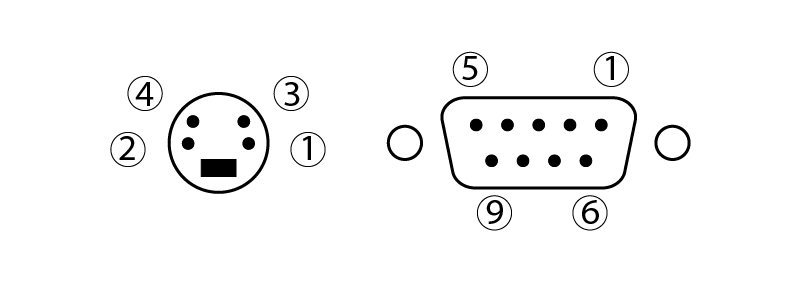
Four main scale inputs on TouchDRO TDA-410 and TDA-420 use female DB-9 (D-Sub 9) connectors preconfigured for one of the scale pinouts listed in the table below.
You select the pinout configuration when you place your order. If you're not sure which pinout your scales use, see DRO Scale Compatibility or contact us before ordering.
| Brand | 1 | 2 | 3 | 4 | 5 | 6 | 7 | 8 | 9 |
|---|---|---|---|---|---|---|---|---|---|
| Ditron, Sino, Aikron, Easson, Vevor | A' | 0V | B' | Shield | R'/Z' | A | +5V | B | R/Z |
| Acu-Rite SENC, Newall TTL Scales | A | A' | B | B' | OV/Gnd | Vcc/5V | R | R' | |
| Electronica/EMS, PM MagExact | +Z | Z' | Vcc/5V | Shield | OV/Gnd | A | A' | B' | B |
| Generic Chinese Pinout (ToAuto, etc.) | 5V | 0V | A | B |
For more detailed information please refer to DRO Scale Compatibility
Auxiliary Inputs
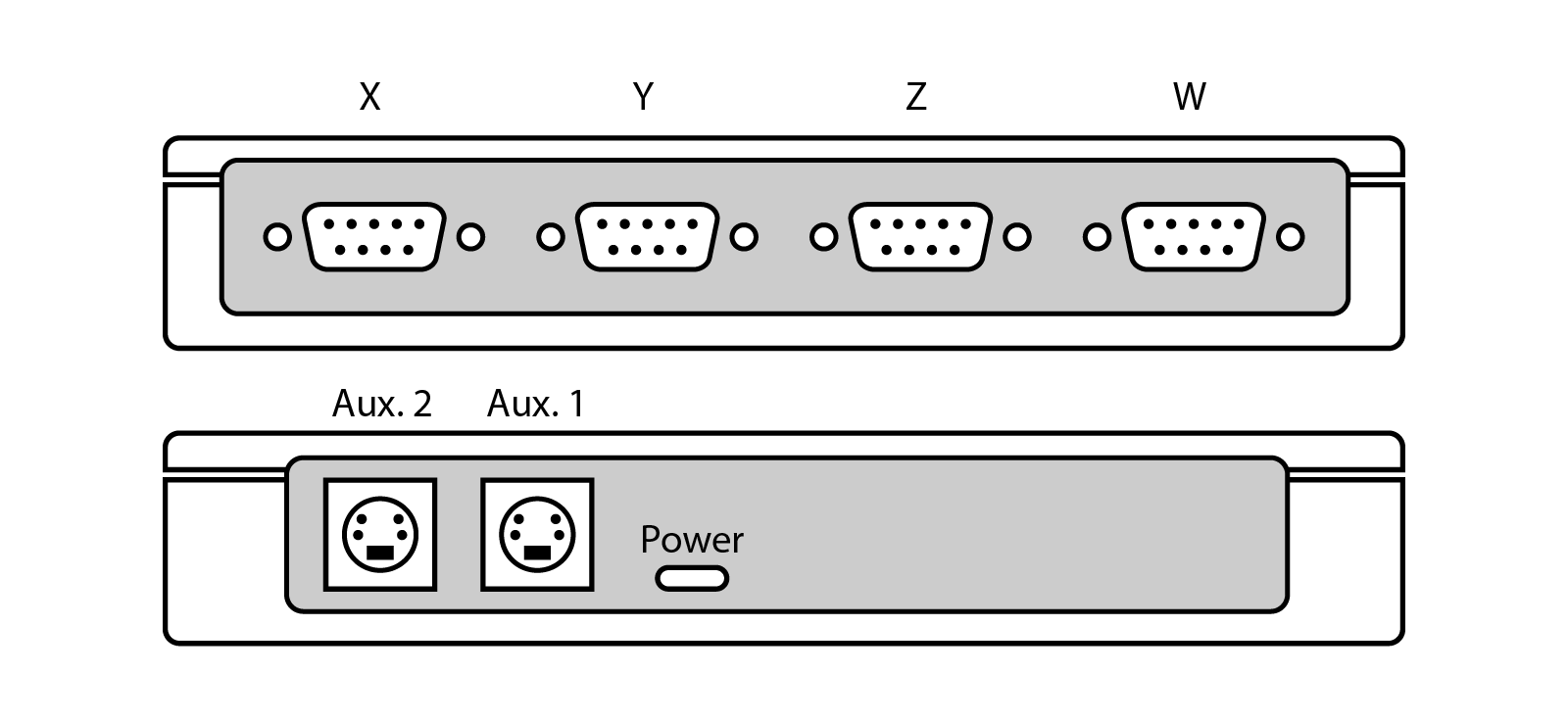
By default, Aux. 1 input is configured for two touch probe inputs, and Aux. 2 is configured for tachometer input. The table below shows all possible input configurations. The mode for each auxiliary input is selected in the Adapter Details dialog.
| Pin 1 | Pin 2 | Pin 3 | Pin 4 | Note | |
|---|---|---|---|---|---|
| Touch Probe | Gnd. | 5V | "q" signal | "p" signal | Aux. 1 only |
| Tachometer | Gnd. | 5V | "t" | --- | Aux. 2 only |
| Quadrature | Gnd. | 5V | A | B | Aux. 1 - "u", Aux. 2 - "v" |
| Limit switch X/Y | Gnd. | 5V | X | Y | |
| Limit switch Z/W | Gnd. | 5V | Z | W | |
| Serial data | Gnd. | 5V | Clock | Data |
Port Layout and Pin Functions
Touch Probe Wiring
The TDA-420 scale adapter supports up to two triggering touch probe inputs, carried on the "p" and "q" trigger ports. Which port a given probe uses is selected in its probe profile. The inputs support normally-open and normally-closed touch probes and tool setters. Note that input type is automatically detected during adapter boot time. Therefore, the probe must be plugged in and not triggered when the adapter is powered up, or the probe will not function correctly.
Three-Wire Probes
Three-wire probes have internal components used for signal conditioning and/or driving two-color LEDs. The three leads are Vcc, Ground, and Signal leads and should be connected to 5V, Ground, and "p" (or "q") inputs respectively.
Two-Wire Probes
Two wire probes usually behave like a basic electrical switch:
- Conductive probes and tool setters are normally-open. When the stylus touches the workpiece (or the cutter touches the tool setter surface), the circuit is closed through the machine's body.
- Non-conductive kinematic probes are normally closed. When the stylus is deflected by touching the workpiece, the connection is broken.
To connect the probe to TouchDRO, solder one of the probe's leads to the Ground pin and the other to "p" or "q" input:
- For the touch probes without LED, the orientation does not matter.
- Touch probes with LEDs that are designed for a 5V system will work with the pins wired in either orientation. To retain the LED function, refer to your touch probes documentation to determine which wire is connected to 5V.
- Touch probes with LEDs that are designed for operation voltage higher than 5V might not work when the LED is forward biased. Such probes need to be wired "backward" to reverse-bias the LED (and effectively take it out of the circuit).
Before using the probe, it is a good idea to verify that it produces a clean on/off signal. With the probe plugged in and the TouchDRO unit powered up, measure the voltage between the probe signal pin and ground. When the probe is in its default (closed) state — as is typical for normally-closed kinematic probes — the voltage should be close to 0V. When the stylus is deflected, the voltage should read between 4.8V and 5V. Anything outside these ranges suggests a wiring issue or an incompatible probe type.
Additionally, ensure the probe stylus is properly centered before use. A mis-centered stylus will introduce repeatable error into measurements. Centering procedure is typically described in the probe's manual.
Technical Characteristics
Position Refresh Rate
The adapters send the scale position to the application every 40 milliseconds (25 times per second) when active, and once per second when idle.
Quadrature Signal Frequency
The maximum recommended quadrature signal frequency is 1 MHz. This is equivalent to a 1 micron scale moving at 4 meters per second, or a 5 micron scale moving 20 meters per second. The absolute maximum frequency is a bit under 4 MHz.
The two auxiliary inputs (TDA-420 only) can reliably handle combined quadrature signal frequency of 100 KHz. In other words, if both axes are moving, their combined signal frequency should not exceed 100KHz; when a single axis is moving, it can output a full 100KHz. This is equivalent to a 1-micron scale moving at 0.4 meters per second, which is on-par with most modern DRO units.
Reference, Touch Probe, and Home Switch Latency
When the reference lines, touch probe, and home switch line signal changes from on to off state, the adapter must respond to the event and perform the appropriate action. This takes some amount of time. The TDA adapters can handle the interrupt in about 2 microseconds or less. This translates to some amount of repeatability error. For example, a home switch is triggered when a 1-micron scale is moving at 1 meter/second, the error will be 8 encoder steps, or 8 microns. At a more reasonable speed, the error will be well under one encoder step.
Tachometer Signal Frequency
The adapters have a low limit of 0.5Hz and upper limit of 100 KHz input frequency for the tachometer. In other words, the adapter will count pulses that are at most 2 seconds apart, and up to 1/100000 of a second. In terms of RPM, this translates to 30 RPM minimum and 6 million RPM maximum with a single-slit tachometer disk, or 3 RPM to 600,000 RPM with a ten-slit disk. The measurement error is under 1%.
Minimum/Maximum Ratings
| Nominal | Minimum | Maximum | |
|---|---|---|---|
| Supply Voltage | 5 V | 4.0 V | 5.5 V |
| Current Draw | 150 mA | 50 mA | 300 mA |
| Primary Scale Inputs | |||
| Signal Frequency | 1 MHz | --- | 4 MHz |
| Min Edge Separation | 250 ns | 250 ns | --- |
| Reference Trigger Latency | 2 µs | 2 µs | 2 µs |
| Signal High Level | 5 V | 2 V | 5.5 V |
| Signal Low Level | 0 V | -0.3 V | 0.8 V |
| Auxiliary Inputs | |||
| Quadrature Signal Frequency | 50 KHz | --- | 100 KHz |
| Min. Edge Separation | 5 µs | 5 µs | --- |
| Probe/Home Switch Latency | 2 µs | 2 µs | --- |
| Tachometer Signal Frequency | 100 KHz | 0.5 Hz | 100 KHz |
| Signal High Level | 5 V | 2 V | 5.5 V |
| Signal Low Level | 0 V | 0 V | 1.1 V |
Frequently Asked Questions
[Expand]What is the difference between the TDA-410 and TDA-420?
The TDA-410 and TDA-420 are built on the same hardware and run the same firmware. The only difference is that the TDA-420 adds two auxiliary TTL inputs on the back panel, which can be used for a touch probe, tool height setter, tachometer, additional encoder axes, or home switches. If you need touch probe support (now or in the future), choose the TDA-420. Otherwise, the TDA-410 is sufficient.
Can I use a 3-wire (active) touch probe with the TDA-420?
Yes, provided it uses an NPN or Push-Pull output. PNP probes are not supported. Three-wire probes connect their Vcc, Ground, and Signal leads to the 5V, Ground, and 'p' (or 'q') input pins respectively.
Will the DRO lose its position if the power goes out?
No. Both TDA adapters include non-volatile memory (EEPROM) and a power-loss detection circuit. When power is cut, the adapter saves the last known position. When power is restored, it verifies data integrity and restores the positions automatically. If the check fails (for example, if the scales were moving at the moment of power loss), the app will display an alert.
How do I connect iGaging or Mitutoyo SPC scales?
iGaging and Mitutoyo scales use serial protocols rather than quadrature signals, so they require a compatible signal converter module (sold separately). Once the converter is connected, the input protocol for each axis can be switched in the Adapter Details screen, accessible via the green adapter icon in the upper-right corner of the TouchDRO app.
What if my scales use a different pinout than my adapter?
The scale pinout is set by small swappable pinout boards inside the adapter. We offer free lifetime exchanges: order the replacement boards, return the originals within 90 days with a copy of your order receipt, and we'll refund the replacement in full. You can also contact us to arrange a free re-pin instead.
Regulatory Compliance
FCC Compliance Statement
This equipment has been tested and found to comply with the limits for a Class B digital device, pursuant to part 15 of the FCC Rules. These limits are designed to provide reasonable protection against harmful interference in a residential installation. This equipment generates, uses and can radiate radio frequency energy and, if not installed and used in accordance with the instructions, may cause harmful interference to radio communications. However, there is no guarantee that interference will not occur in a particular installation. If this equipment does cause harmful interference to radio or television reception, which can be determined by turning the equipment off and on, the user is encouraged to try to correct the interference by one or more of the following measures:
- Reorient or relocate the receiving antenna.
- Increase the separation between the equipment and receiver.
- Connect the equipment into an outlet on a circuit different from that to which the receiver is connected.
- Consult the dealer or an experienced radio/TV technician for help.
This device complies with part 15 of the FCC Rules. Operation is subject to the following two conditions: (1) this device may not cause harmful interference, and (2) this device must accept any interference received, including interference that may cause undesired operation.
Radio Module
The Bluetooth radio in the TDA-410 and TDA-420 is an Espressif ESP32-WROOM-32E module, pre-certified under its own grants of equipment authorization.
- Contains FCC ID: 2AC7Z-ESP32WROOM32E
- Contains IC: 21098-ESPWROOM32E
This equipment complies with FCC and ISED radiation exposure limits set forth for an uncontrolled environment. The antenna must be installed and operated with a minimum distance of 20 cm between the radiator and all persons. This transmitter must not be co-located or operating in conjunction with any other antenna or transmitter.
ISED Canada
CAN ICES-3(B) / NMB-3(B)
This device contains licence-exempt transmitter(s)/receiver(s) that comply with Innovation, Science and Economic Development Canada's licence-exempt RSS(s). Operation is subject to the following two conditions: (1) this device may not cause interference; (2) this device must accept any interference, including interference that may cause undesired operation of the device.
L'émetteur/récepteur exempt de licence contenu dans le présent appareil est conforme aux CNR d'Innovation, Sciences et Développement économique Canada applicables aux appareils radio exempts de licence. L'exploitation est autorisée aux deux conditions suivantes : (1) l'appareil ne doit pas produire de brouillage; (2) l'appareil doit accepter tout brouillage radioélectrique subi, même si le brouillage est susceptible d'en compromettre le fonctionnement.
Cet équipement est conforme aux limites d'exposition aux rayonnements ISED établies pour un environnement non contrôlé. Cet équipement doit être installé et utilisé avec un minimum de 20 cm de distance entre la source de rayonnement et votre corps.
Supplier's Declaration of Conformity
| Product | DRO Scale Interface Adapter |
|---|---|
| Models | TDA-410, TDA-420 |
| Responsible Party | Yuriy's Toys, LLC |
| Address | 12210 SW Main St #231239 Portland, OR 97223 United States |
| Contact | store.touchdro.com/pages/contact |
The products identified above comply with 47 CFR Part 15, Subpart B.