
TouchDRO Capacitive Scale Compatibility - iGaging, Shahe, Mitutoyo & More
Capacitive linear scales are inexpensive and easy to cut down to a short length, which makes them a popular choice for a quill scale on a knee mill. On its own, a quill scale is just a standalone readout. TouchDRO can fold it into the Z axis through axis summing, so the knee and quill report as a single combined Z position. Capacitive scales also work as the main scales of a mini mill or mini lathe digital readout (DRO). This page covers which capacitive scales work with current-generation TouchDRO adapters, and what each one takes to connect.
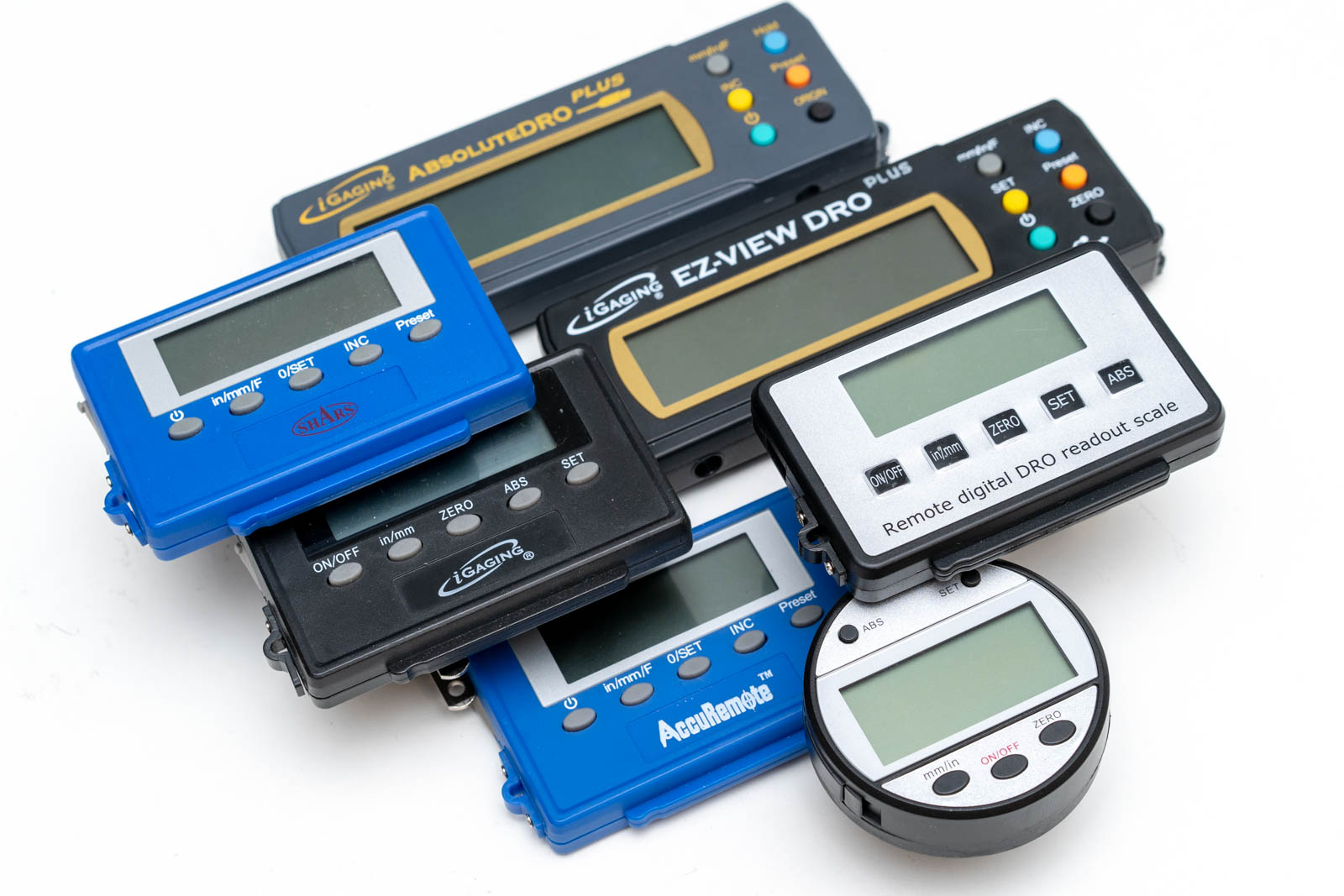
The scales all look much the same from the outside, but internally they vary a lot: data format, communication protocol, connector, and supply voltage all differ between models. That variation is what decides compatibility. Rather than walk every model, the table below groups the scales by family and tells you which ones plug in, which ones need a cable you build yourself, and which ones aren't worth the trouble.
This list isn't exhaustive. Capacitive scales get rebranded and revised constantly, so if yours isn't named here, that doesn't rule it out. The scale-identification section at the end covers how to tell a modern, supported scale from an older one by its battery and connector.
How TouchDRO Reads Capacitive Scales
Capacitive scales work differently from standard digital readout scales. Rather than sending raw pulses to the DRO display as the scale moves, capacitive scales keep track of the movement internally and send the position to the readout in a digital format. This is one of the two reasons you can't normally connect these scales to a traditional digital readout: the display simply doesn't know how to decode the data coming from the scales. The second reason is the supply voltage (and the output signal amplitude). Capacitive scales are designed to be powered from a 1.5V or 3V cell battery, and won't tolerate the 5V supply that is used by glass and magnetic digital readout scales.
TouchDRO uses a two-step approach to reading capacitive scales. First, a small signal converter circuit with a dedicated voltage regulator provides the supply voltage that is appropriate for the scale. A level shifter converts the 1.5V or 3V signal back to the level that the TouchDRO main adapter's input expects (0-5Vpp). This signal converter also acts as the physical adapter between the scale's cable and the DB-9 input connectors.
The firmware running in the TouchDRO adapter has the ability to configure the inputs to decode various digital data formats: the iGaging 21-bit protocol used by EZ-View and DigiMag scales, the Mitutoyo SPC protocol used by Absolute DRO Plus and Mitutoyo's own Digimatic instruments, and BIN6, used by Shahe scales and most digital calipers.
Thus, to connect a capacitive scale to a TouchDRO adapter (TDA-410, TDA-420, or a DIY kit), you will need a converter (one per axis): the iGaging scale converter handles both iGaging families, the 21-bit EZ-View line and Absolute DRO Plus. The Shahe scale converter handles the BIN6 Shahe scales, and Mitutoyo's Digimatic instruments use the Mitutoyo SPC converter. Supply voltage varies between scales: some run on 3 V, some on 1.5 V, and Shahe scales are odder still, taking a 3 V supply but putting out a 1.5 V signal. The converter takes care of all of it, so the voltage isn't something you need to design around.
One thing the converter can't do for you is tell the adapter what it is. Every adapter input starts out in "Quadrature A/B" mode, so after you plug in a converter, set that input's mode to the converter's protocol ("iGaging 21 Bit" for EZ-View and DigiMag, "BIN6" for Shahe, or "Mitutoyo SPC" for both Digimatic instruments and AbsoluteDRO Plus, which speaks the same protocol) in the Adapter Details dialog and restart the adapter when prompted. Until then, the axis won't read.
Scale Compatibility
The table below uses four compatibility tiers, in rough order of effort: Directly supported (connect the matching converter and the scale's own cable, no wiring work), Supported with a custom cable (the protocol and converter are fine, but the scale's cable is hard-wired with a nonstandard pinout, so you build a DIY USB cable), Supported but not recommended (TouchDRO can read it, but the scale itself is a poor basis for a digital readout), and Not supported (no firmware path).
| Scale Models / Families | Compatibility Level | Notes |
|---|---|---|
| iGaging | ||
| The most common capacitive scales used with TouchDRO. There are two families: the 21-bit EZ-View / DigiMag line and the newer Absolute DRO Plus. Both connect through the iGaging scale converter, one per axis. | ||
| iGaging Absolute DRO Plus | Directly supported | True absolute encoder, so it keeps position with the power off, on a stainless steel frame. It handles shop noise better than the other capacitive families, which is why it's the one we'd point a new build toward. See the Absolute DRO Plus guide. |
| iGaging EZ-View DRO / DigiMag (also sold as AccuRemote and Shars) |
Directly supported | The 21-bit protocol, sold under several brand names with the same electronics inside. Works, but more prone to noise glitches than the other supported families. See the EZ-View / 21-bit guide before committing to them. |
| Shahe | ||
| Shahe (Sanhe Measuring) sells a "Remote DRO" linear scale line in three forms. All three use the self-clocked BIN6 protocol and run through the Shahe scale converter. What separates them is the cable. See the Shahe scales guide for model-by-model detail. | ||
| Shahe 5403F (Square Display) (formerly sold as 5403-xxxA) |
Directly supported | The USB cable plugs into the display and uses a standard pinout. Connect it to the Shahe converter and go. |
| Shahe 5403 (Round Display) (formerly sold as 5403-xxx) |
Supported with a custom cable | Electrically fine, and the BIN6 stream reads normally, but the cable is hard-wired into the display with a nonstandard pinout. You'll need to build a DIY USB cable to connect it to the Shahe converter. |
| Shahe 5401 (Vertical Type) | Supported with a custom cable | Same BIN6 protocol, and the same nonstandard pinout as the Round Display. It needs the same DIY USB cable. |
| Mitutoyo | ||
| Mitutoyo's Digimatic instruments use a capacitive absolute encoder and the Digimatic serial protocol, also called SPC. They connect to TouchDRO through the Mitutoyo SPC converter, and the Digimatic quill scale is a common choice for a quill axis. See the Mitutoyo Digimatic / SPC guide for the cable each instrument needs. | ||
| Digimatic / SPC instruments (calipers, micrometers, indicators, quill scales) |
Directly supported | Connect through the Mitutoyo SPC converter using a Mitutoyo data cable matched to the instrument's connector. No wiring work, though the cable is a Mitutoyo factory part rather than a generic one. |
| Other Chinese Scales | ||
| Older and bargain-grade capacitive scales: generic 48-bit linear scales and inexpensive digital calipers. They can look much like the modern scales above, but they are a different proposition, and neither is a scale we'd recommend building a machine around. | ||
| Generic 48-bit linear scales | Not supported | The older Sylvac 48-bit format on a 1.5 V supply. Current TouchDRO firmware doesn't decode it. These scales are also prone to noise and random position jumps even on their original readouts. See the 48-bit Chinese scale guide. |
| Inexpensive digital calipers | Supported but not recommended | Calipers that use the BIN6 format can be read through the Shahe converter. The problem is the calipers themselves: most auto-shut-off and reset to zero when they power-cycle, which makes them unreliable as a DRO. Fine for experimenting, not for a real installation. See the digital caliper guide. |
Telling a Modern Scale From an Old One
The supported iGaging and Shahe scales can look almost identical to the older 48-bit scales and calipers that aren't worth using. Two things tell them apart quickly. Check both before buying a used scale, or to place a scale you already have.
The battery and frame. Modern supported scales run on a 3 V coin cell with the negative terminal connected to the frame. Older 48-bit scales and calipers run on a 1.5 V cell with the positive terminal to the frame. A 3 V cell is the first good sign.
The data connector. Modern scales use a USB Mini-B or Micro-B data connector. The older 48-bit scales and calipers use the flat 4-pin caliper data port: an opening molded into the plastic housing with four exposed pads. That flat port is the clearest tell that a scale is one to avoid.
For a fuller breakdown of what varies between capacitive scales and why it matters, see Differences Between Capacitive Scales. If you're still deciding what to buy, the Recommended DRO Scales guide covers the capacitive options alongside glass and magnetic scales.