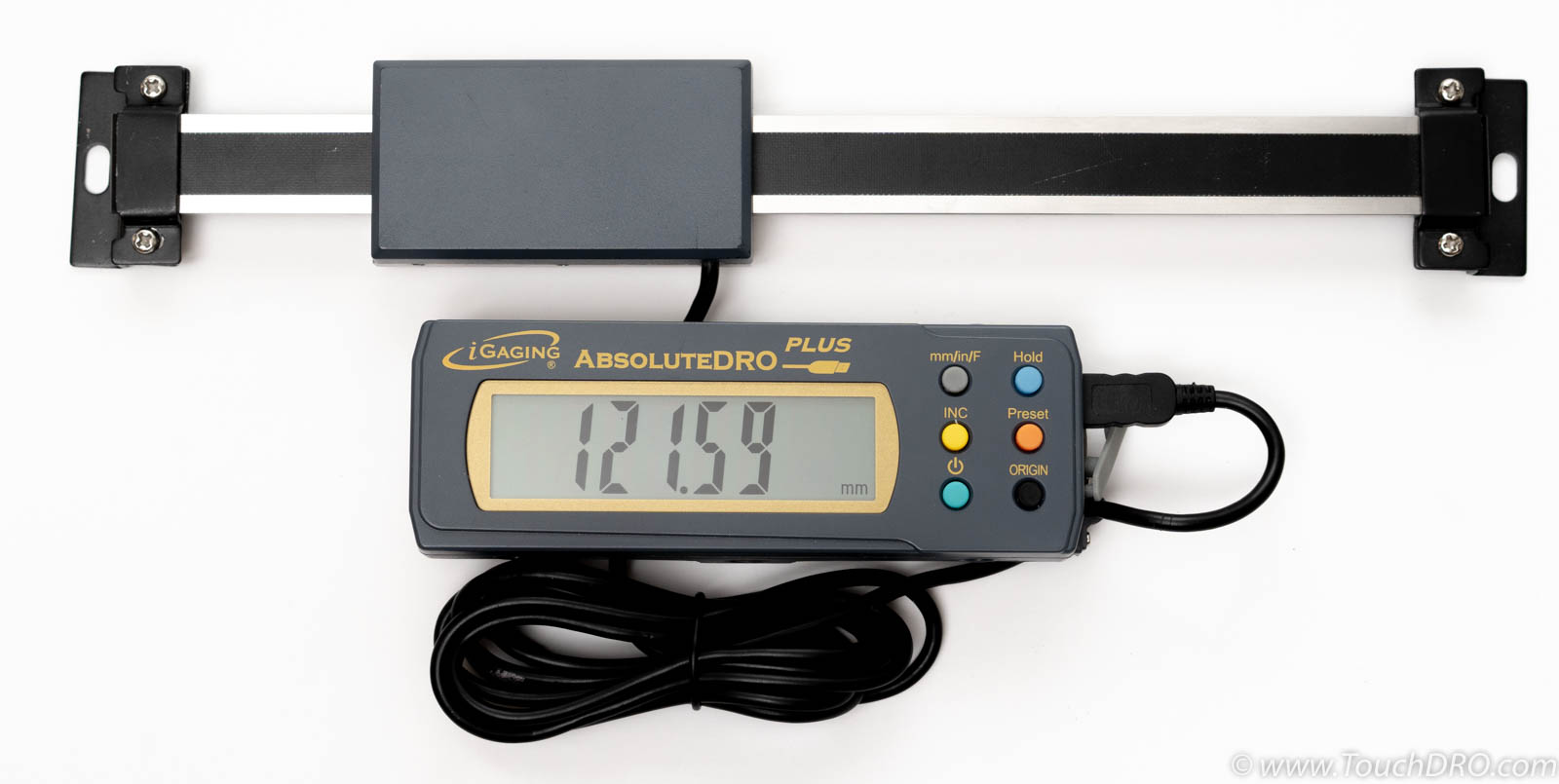
iGaging AbsoluteDRO Plus Scales

iGaging AbsoluteDRO Plus linear scale with remote display

iGaging AbsoluteDRO scales were introduced several years after the original iGaging DigiMag / EZ-View series. AbsoluteDRO Plus scales add a true absolute encoder strip, a stainless-steel frame and reading-head body, and a faster native refresh rate. In practice, they behave much better than classic EZ-View/DigiMag 21-bit scales: they are less prone to electrical noise, offer more consistent repeatability, and are generally a better choice when you want a “keep it simple” capacitive scale.

AbsoluteDRO Plus scales were first sold with USB Mini-B connectors and later switched to USB Micro-B. The Micro-B versions use a pin mapping similar to other iGaging scales, while the Mini-B versions use a different wiring scheme. Because of this, a generic Mini-to-Micro adapter cannot be used directly; Mini-B versions need to be connected via breakout boards or wired to the appropriate connector for the TouchDRO iGaging Absolute converter board .

Scale Models and Naming

There are two main variants of this scale family:

  • iGaging AbsoluteDRO (original version, no “Plus” on the label) – uses USB Mini-B cables and a proprietary data protocol that is not compatible with current TouchDRO firmware. Treat these as unsupported.
  • iGaging AbsoluteDRO Plus – visually almost identical, but the display explicitly says “Plus.” Early units used USB Mini-B; later ones switched to USB Micro-B connectors. These scales are supported via the TouchDRO iGaging Absolute converter .

Technical Details

Power supply voltage 3 V
Scale frame connection Ground
Resolution 10 µm / 0.00039"
Material Stainless steel
Accuracy 0.001"/6"
Refresh rate Up to 50 Hz
Available lengths 6", 12", 24", and 36"

Data Format and Protocol

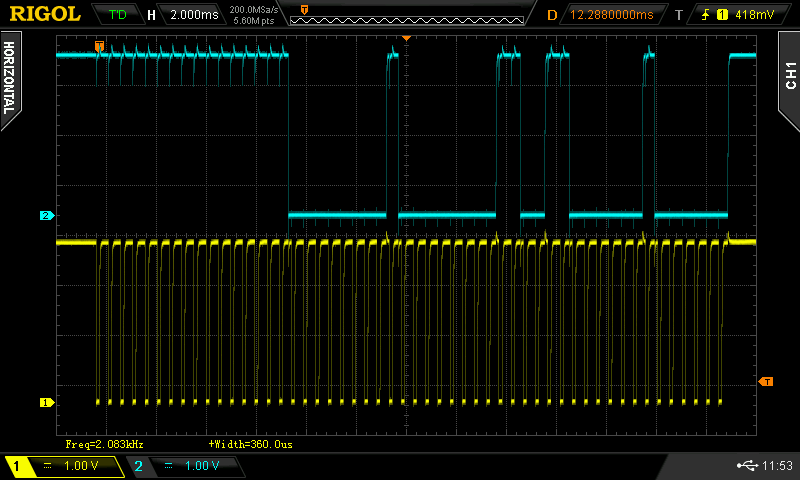
iGaging AbsoluteDRO Plus scales transmit data in a format that, at first glance, looks similar to the Mitutoyo Digimatic SPC protocol. The overall structure is comparable, but there are several important differences:

  • AbsoluteDRO Plus uses binary encoding instead of BCD (binary-coded decimal).
  • Some flag bits are unused or can be safely ignored by the receiver.
  • There is no full request/acknowledge handshaking; the scale sends a continuous data stream whenever the REQ line is held low.
Oscilloscope capture of iGaging AbsoluteDRO Plus serial data stream
iGaging AbsoluteDRO Plus data stream timing

From the TouchDRO side, the iGaging Absolute converter board handles this protocol and presents clean, conditioned signals to a TouchDRO TDA-420 Plus pre-assembled DRO adapter (or its TDA-400 variant), so you do not need to parse the raw AbsoluteDRO Plus data format yourself. From the adapter’s point of view, the converter simply looks like another supported scale input with clean clock/data lines.

How to Use iGaging AbsoluteDRO Plus Scales with TouchDRO
There are three practical ways to use iGaging AbsoluteDRO Plus scales with TouchDRO. In order of preference, they are:

  1. Recommended: iGaging AbsoluteDRO Plus scales with USB Micro-B connector + TouchDRO iGaging Absolute converter board + TDA-4xx pre-assembled TouchDRO adapter .
  2. Advanced DIY: USB breakout board plus a custom input circuit that emulates the converter’s function, typically built around an ESP32 or similar MCU.
  3. Last resort: Re-terminating or replacing the original cable and wiring directly to a breakout/connector, using PCB test points to identify signals.

For almost all users, option 1 (pre-assembled TDA-4xx adapter + iGaging Absolute converter) is the right answer. Options 2 and 3 are only for people who are comfortable designing, building, and troubleshooting their own electronics.

Recommended: TDA-4xx Adapter with iGaging Absolute Converter

The intended way to integrate AbsoluteDRO Plus scales into a modern TouchDRO system is:

In this setup, each AbsoluteDRO Plus scale plugs into its converter via the factory USB Micro-B cable. The converter then presents clean logic-level outputs to the TDA-4xx adapter, using the standard Ditron/Sino/Aikron pin mapping on the adapter input. Firmware version 3.2 or newer and TouchDRO V3 (build 2024-06-18 or newer) are required for full support.

This approach:

  • Avoids custom firmware or protocol decoding on your side.
  • Provides proper signal conditioning, level shifting, and REQ handling.
  • Keeps wiring standardized, making future troubleshooting and upgrades much easier.

Advanced DIY: Breakout Board + Custom Input Circuit

If you deliberately want to build your own interface instead of using the stock converter board, the safer starting point is to keep the factory cable intact and land it on a USB breakout, then route signals through your own input circuitry to a DIY adapter or expansion board.

At a minimum, this requires:

  • A USB Mini-B or Micro-B breakout board that matches your scale connector.
  • A custom interface circuit that:
    • Provides the correct 3.3 V supply and REQ handling.
    • Conditions CLOCK/DATA edges and protects the adapter inputs.
    • Understands the AbsoluteDRO Plus binary protocol or reshapes it to something your firmware can consume.

If you want to stay close to the architecture of the official TouchDRO hardware, you can base your design on the same ESP32 module used in the DIY kit:

These are a good foundation if you are intentionally designing your own mixed-scale adapter or custom input board for AbsoluteDRO Plus scales. As a starting point for general DIY adapter design, see:

The following pinout tables are relevant if you are wiring from a breakout into a custom circuit.

USB Mini-B Pin Functions

USB Pin TouchDRO line
5V Ground
D– Data
D+ Clock
ID 3.3 V
GND Ground

USB Micro-B Pin Functions

USB Pin TouchDRO line
5V 3.3 V
D– Clock
D+ Data
ID Ground
GND Ground

Last Resort: Re-Terminating or Replacing Cables

Re-terminating the factory cable (cutting the plug off and soldering the conductors directly to a PCB or connector) is generally not recommended. It introduces strain points, makes future troubleshooting harder, and removes the ability to easily swap scales or boards.

That said, if you are determined to go this route for a one-off project, treat this section as a reference checklist, not a recommendation. Keep the runs short, provide proper strain relief, and avoid sharp bends right at the encoder housing.

Do not rely on the cable color code when mapping conductors. Instead, use the clearly marked test points on the encoder PCB together with a continuity tester to identify each signal.

iGaging AbsoluteDRO Plus encoder PCB with VDD DATA CLOCK REQ and frame test points highlighted
iGaging AbsoluteDRO Plus encoder PCB test points
Test point TouchDRO line
VDD 3.3 V
DATA Data
CLOCK Clock
REQ Ground (request line pulled low)
Frame Ground

TouchDRO Compatibility

In summary, for current-generation TouchDRO systems:

Pros of iGaging AbsoluteDRO Plus Scales

  • True absolute encoder
    The scale always “knows” its position within travel and does not lose reference when powered off, which is particularly nice on a drill-press or mill quill.
  • Better behaved than EZ-View/DigiMag 21-bit scales
    Compared to classic EZ-View/DigiMag capacitive scales, AbsoluteDRO Plus scales tend to be less twitchy, more repeatable, and less sensitive to electrical noise and grounding issues.
  • Good noise resistance for a capacitive scale
    While not in the same league as quality glass scales, AbsoluteDRO Plus scales generally tolerate shop noise better than most low-cost capacitive scales and work well with VFD-driven machines when wired correctly.
  • Powered directly from the TouchDRO system
    Unlike many Mitutoyo-style scales, AbsoluteDRO Plus scales can be powered from the TouchDRO adapter/converter, so there are no separate batteries to manage once the system is installed.
  • Robust stainless-steel construction
    Stainless steel frame and encoder housing provide better durability than typical “hobby-grade” capacitive scales.
  • Excellent choice for a quill scale
    For a mill quill or similar single-axis application, AbsoluteDRO Plus strikes a good balance of cost, convenience, and reliability and is often a more practical choice than a dedicated glass scale kit.
  • Cheaper than Mitutoyo absolute scales
    For applications where you would otherwise consider a Mitutoyo absolute scale, AbsoluteDRO Plus offers much of the same day-to-day usability at a significantly lower price point and integrates cleanly with TouchDRO via the converter board.

Cons and Practical Limitations

  • More expensive than EZ-View/DigiMag 21-bit scales
    AbsoluteDRO Plus scales typically cost more than classic EZ-View/DigiMag capacitive scales. Given the price of modern glass scales, a full 2- or 3-axis AbsoluteDRO Plus setup can end up close to entry-level glass-scale kits.
  • Not the best value for a full DRO system
    For a complete multi-axis DRO, a set of modern glass (optical) scales will generally offer higher resolution, better long-term stability, and fewer electrical “gotchas” for only a modest increase in total cost.
  • Mini-B wiring is nonstandard
    The Mini-B version uses a different pin mapping than the Micro-B version, and both differ from typical USB expectations. Careful attention to pinout (and sometimes 5-conductor cabling) is required when wiring to the converter or a custom adapter.
  • Limited lengths and availability
    Length options and availability can be more limited than common glass-scale kits, especially outside of the USA.

Summary and Recommendations

iGaging AbsoluteDRO Plus scales are a clear step up from older EZ-View/DigiMag 21-bit scales. They offer absolute position tracking, a stainless-steel frame, a fast refresh rate, and noticeably better behavior in noisy shop environments. However, when you look at the total cost for multiple axes, a good set of glass (optical) scales usually delivers higher resolution, better repeatability, and fewer electrical headaches for only a bit more money.

For most new multi-axis TouchDRO installations, the practical recommendation is to choose one of the glass or magnetic scale families listed on the Recommended DRO Scales page rather than building an entire system around AbsoluteDRO Plus scales.

Where AbsoluteDRO Plus really shines is as a single-axis upgrade – especially as a quill scale on a milling machine or drill press. In that role, an AbsoluteDRO Plus scale connected through the TouchDRO iGaging Absolute converter board offers a very nice mix of absolute positioning, good noise immunity for a capacitive scale, and lower cost than a comparable Mitutoyo absolute setup, all while integrating cleanly with the rest of your TouchDRO system.