
TouchDRO vs Traditional DROs
TouchDRO has been around since 2012, and the most common question we hear is some version of: "Why is TouchDRO better than a traditional DRO?"
The answer: it's not better or worse. It's different. This page is here to help you figure out which one is a better fit for you.
If you don't want to read the whole thing: TouchDRO is an information system. It excels at complex layouts, stored setups, and visual workflow. A traditional DRO is a position display. It excels at tactile controls, simple installation, and industrial environments. With the same scales, accuracy is identical.
We sell TouchDRO hardware. It pays our bills, and of course we love it when people buy it. We also regularly help people decide not to buy it. That's not false modesty; it's practical. We'd rather point you toward a quality traditional DRO than end up with a frustrated customer.
A Note About Chinese Import DROs
Many people cross-shop TouchDRO with budget import digital readouts. That makes sense. Most of us don't have an unlimited budget for a DRO setup. On paper, these units offer a feature list that looks similar to more expensive consoles: basic modes, simple pattern functions, multi-axis display.
The tradeoffs are in the details: enclosure and keypad quality, noise immunity, display responsiveness, documentation, unit-to-unit consistency, and especially support and parts availability. The comparisons below still apply in broad strokes, but real-world experience with import DROs varies a lot by vendor and batch.
If your budget is tight and your needs are basic, a decent import DRO can be a reasonable starting point. Just go in with realistic expectations about support and longevity.
Spec sheets only tell you so much. Here's what actually matters when you're standing at the machine.
Where They're About the Same
Accuracy
With the same scales installed and aligned properly, TouchDRO and a traditional DRO will have the same accuracy, resolution, and repeatability. Most modern systems also provide some form of linear error correction, and (aside from very old or very low-cost units) can handle the travel speeds common on manual machines without missing encoder counts.
Core Functions
Both systems handle the basics fine: inch/mm, ABS/INC, radius/diameter, center finding, and other standard DRO functions. Some form of tool and sub-datum memory exist on many traditional units too, though capacity and workflow vary a lot by model.
Position Retention and Recovery
TouchDRO adapters retain position in non-volatile memory and support home/limit switches and reference inputs. Traditional DROs vary: many incremental systems re-home to reference marks after a restart, while some high-end setups use absolute scales that pick up where they left off. In practice, both can work well. The difference is how automatic the recovery is on your setup.
Probes and Auxiliary Inputs
Touch probes and spindle tachometers are supported by many modern DRO systems, including TouchDRO. The underlying capability is similar: probes can be used for edge finding and referencing, and tachometers provide real-time RPM display. Differences tend to be in interface and workflow rather than raw functionality and depend heavily on the specific DRO model and configuration.
Display Responsiveness
The display responsiveness, refresh speed, and smoothness is about the same between TouchDRO and quality traditional DRO consoles. TouchDRO might have a very slight edge here due to higher tablet screen refresh rate, but you will not feel any lag on either system.
Where TouchDRO Is Better
Workflow for Complex Manual Work
TouchDRO is faster when you're doing more than "move to a number." Bolt circles, hole patterns, repeated setups, switching datums, and returning to a job weeks later all take less button-pushing and less mental overhead than on most stand-alone consoles.
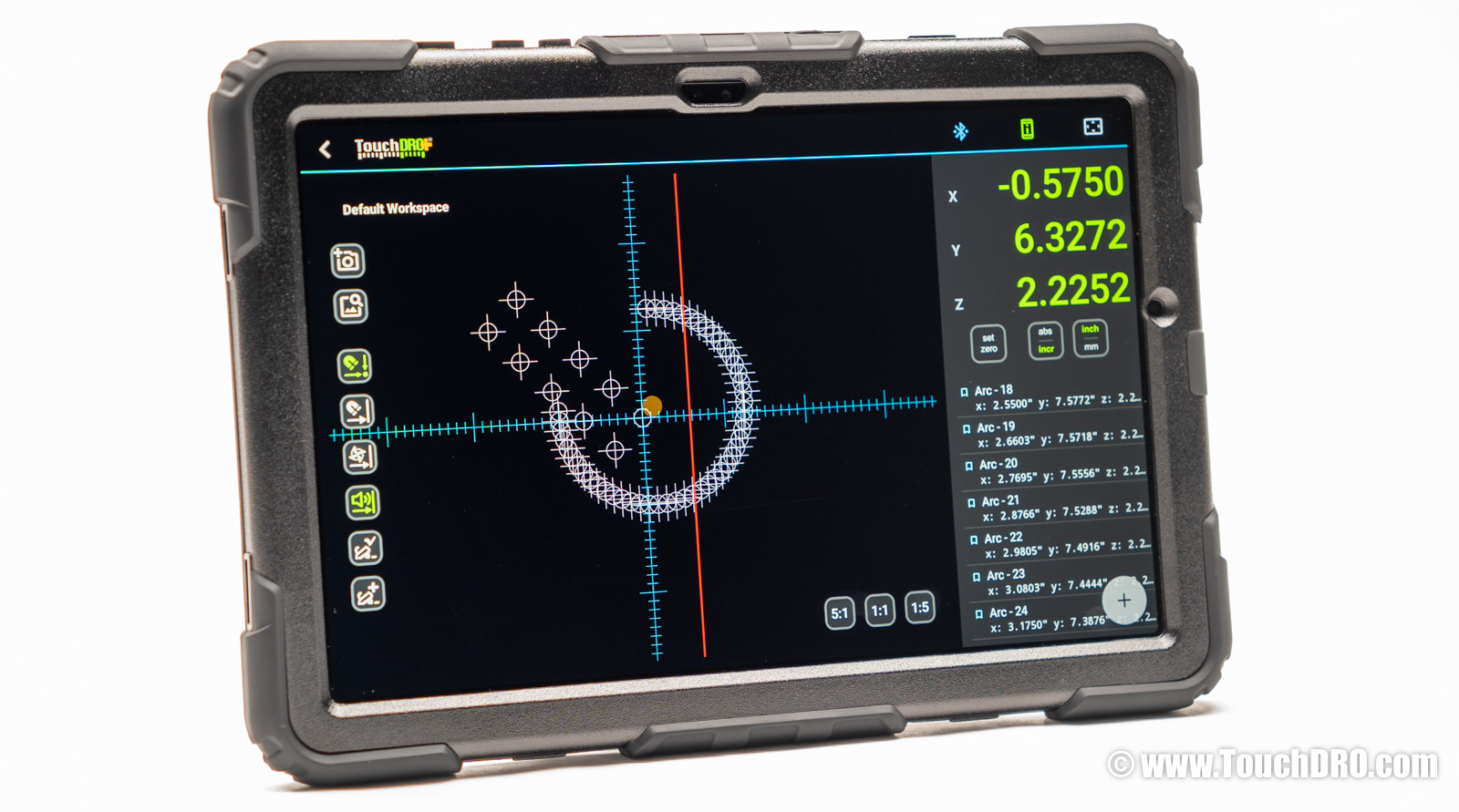
Graphical Workspace and Layout Preview
The on-screen 2D view lets you verify patterns and feature positions before cutting. Useful for one-off work where a mistake means scrapping the part.
Axis Summing and Configuration Flexibility
TouchDRO handles setups that are awkward on traditional DROs: summing knee and quill into one Z-axis, mixing scale types (glass, magnetic, capacitive), and different resolutions on different axes. Common in retrofits; usually requires extra hardware or workarounds on traditional systems. On a mini mill, where a full-size scale won't fit every axis, you can run slim glass scales where they fit and a capacitive scale where they don't.
Job Memory and Workspace Management
Coordinates, datums, and setups are stored in a way that fits how small shops actually work. Switch fixtures, set a job aside for a week, come back, and your setup is still there.
Modular Architecture
Display and scale interface are separate. If the tablet breaks, replace the tablet. You're not buying a whole new console.
Wireless Installation
TouchDRO is a Bluetooth DRO: the adapter mounts at the machine, and the display talks to it over Bluetooth (or USB, if you prefer a wire). There is no display cable to route through the machine, and the tablet can sit wherever it is easiest to see. A traditional console hangs off an arm, wired to every scale.
Software Updates
New features arrive as app or firmware updates. Reference image overlay, for example, was added to existing hardware; no new adapter required.
Measurement and CAD Workflows
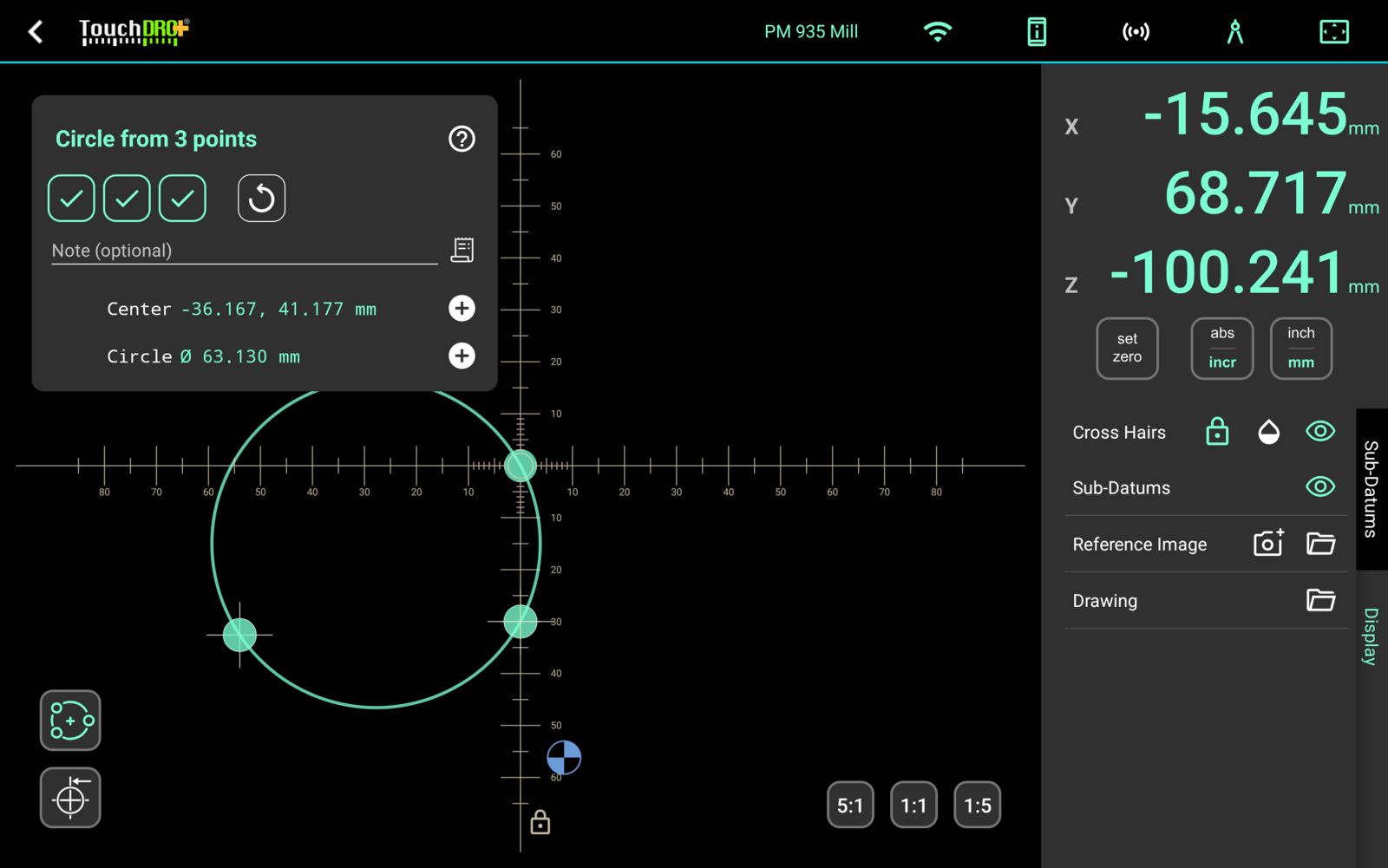
Recent releases moved TouchDRO into territory that consoles never covered. With a touch probe, measurement mode turns the machine into a basic coordinate measuring device: you can probe edges, bores, and part features, measure distances and angles between them, and export the probed geometry as a DXF file.
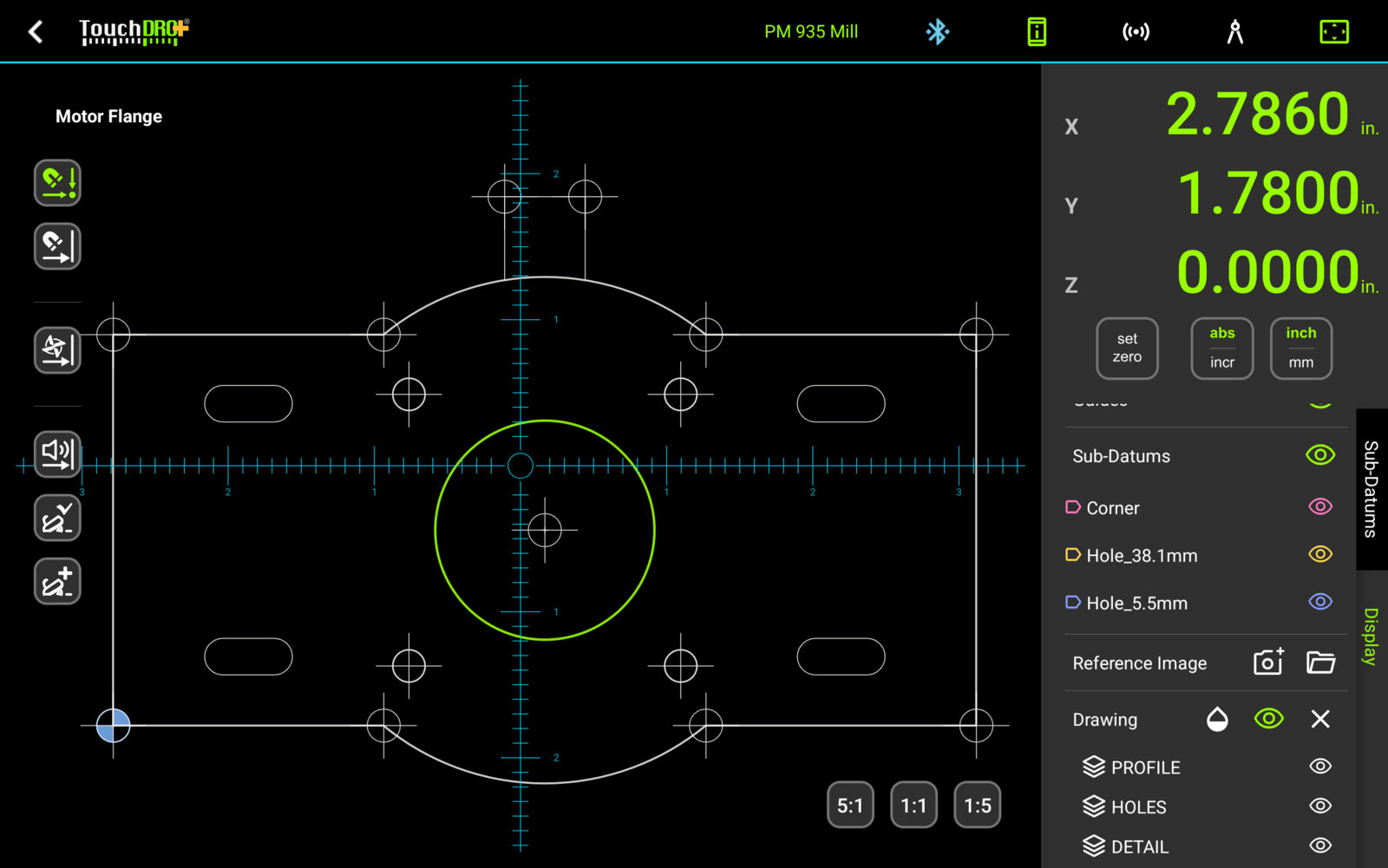
Working in the other direction, TouchDRO imports DXF drawings from your CAD program, so you can work directly to the drawing on screen instead of a printed dimension sheet. A live camera feed handles optical centering and edge finding.
Most of these functions are part of TouchDRO Plus. On the console side, this class of functionality simply doesn't exist; the closest equivalents are stand-alone metrology systems priced well above a typical DRO.
Where Traditional DROs Are Better
Appliance Simplicity
Traditional DROs are often sold as a complete package: scales, console, and mounting hardware. You mount the scales and the display, plug everything in, and you're running. With TouchDRO, you typically choose the tablet and scales separately, set up a tablet mount, install the app, and configure it for your machine.
Environmental Robustness
Quality traditional DROs are sealed industrial enclosures built for heat, dust, and day-to-day abuse. TouchDRO adapters handle shop noise fine and are built for shop environments, but the display is still a tablet. A decent case, a screen protector, and a solid mount go a long way. The weak point isn't usually the tablet; it's a bad mounting job.
Tactile Controls
Physical buttons work with gloves, oil, and coolant. You can operate by feel without looking. Some machinists will always prefer this. TouchDRO's primary interface is a touchscreen, and while some tablets offer haptic feedback, it's not the same as real switches.
Familiarity
If you've used the same DRO style for 20 years, you'll be productive immediately. TouchDRO requires learning a different interface, even if it's ultimately faster for complex work.
Bottom Line
Traditional DROs are rugged, familiar, and straightforward. TouchDRO trades some tactile simplicity for better visualization, flexible workflows, and a system that improves over time.
If your work is repetitive and straightforward (same operations, same setups, day after day), you probably don't need TouchDRO. A traditional console will do the job with less setup effort.
TouchDRO's strengths (visualization, job memory, flexible configuration) only matter if you use them. If your work doesn't need those features, you're paying for capability you won't use.
If you do layouts, patterns, frequent setup changes, or jobs that come back months later, TouchDRO offers capabilities traditional DROs weren't designed for.
If you're leaning toward TouchDRO but worried about the learning curve: most users are comfortable with the basics within a few hours. The deeper features take longer to explore, but you can start simple.
Not sure which camp you fall into? Drop us a line and tell us what machines you have and what kind of work you do. We'll give you a straight answer.
Frequently Asked Questions
[Expand]Is TouchDRO as accurate as a traditional DRO?
Yes. Accuracy comes from the scales and how well they're installed, not the display. Any modern quality DRO (TouchDRO included) can keep up with high-resolution scales at normal manual machining speeds. Same scales, same accuracy.
What happens to my zero if the power goes out or the tablet shuts down?
Your position is stored in the adapter, not the tablet. Current adapters save axis positions to non-volatile memory on power loss. When the tablet reconnects, you pick up where you left off. For additional insurance, TouchDRO supports reference marks on compatible scales, or you can add home switches if your scales don't have them.
Does Bluetooth lag or drop in a shop environment?
This comes up a lot, but it's rarely a problem in practice. The connection issues we've seen almost always trace back to a bad tablet, poor placement, or a poorly built DIY adapter, not Bluetooth itself. With current TouchDRO adapters and sensible placement, the connection is reliable and doesn't add meaningful latency.
Can I use my existing scales?
Yes, with few exceptions. TouchDRO supports most modern glass and magnetic scales (TTL or RS-422) out of the box: Chinese imports, Electronica/EMS, many Acu-Rite incremental scales, and others. Capacitive scales like Mitutoyo Digimatic and iGaging work too. Legacy quadrature scales usually just need a connector rewire. Mixed setups (different types or resolutions on different axes) are no problem.
Is TouchDRO harder to set up than a traditional DRO?
There's more one-time setup. You choose a tablet, mount it, install the app, and configure the system. Most people are up and running in an hour or two. Some take longer if they're being methodical, but it's not a weekend project. If you want plug-and-go simplicity and don't need the extra features, a traditional console is faster to get started.
What if I just want big, readable numbers?
Some users pick TouchDRO not for the features, but for the screen. A 10" tablet with large, high-contrast digits is simply easier to read than most DRO consoles, especially at a distance or in poor light. If that's you, the extra capability is a bonus.