
DRO Scale Compatibility: Will Your Scales Work with TouchDRO?
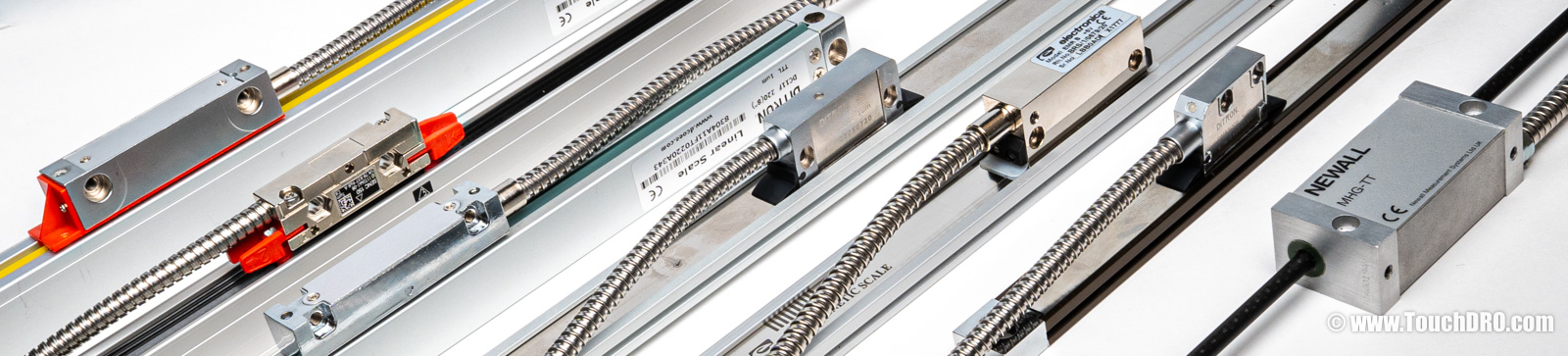
We often get messages from machinists looking to replace an older digital readout (DRO) console: a dead Acu-Rite VUE or 200S, an aging Anilam Wizard, or a Heidenhain ND that finally gave up. Sometimes they want more functionality than the original offers; sometimes it just failed outright. Either way, the first question is usually the same: will my existing scales work with TouchDRO? In most cases, yes. TouchDRO works with most DRO scales made in the last 20-plus years, and quite a few older ones as well.
We've tested scales from all of the major digital readout brands, along with more than a few oddball ones. The table below shows the scale brands and models we've tested, how they connect to a TouchDRO adapter, and what you need to make it work; that can be an adapter cable, a connector swap, or just the right pinout option when you order your adapter.
This list isn't exhaustive; if your scales aren't on it, that doesn't automatically rule them out. Further down the page, we go over the basic rules for identifying a compatible scale by the connector and pin labels, so even if your exact model isn't listed, you can usually tell whether it's likely to work.
Scale Signal Types
Before diving into specific scale brands, let's do a quick primer on scale signal types. Almost every DRO scale you're likely to encounter fits into one of four signal families:
- Digital square-wave quadrature: TTL (single-ended 5V) or its differential cousin RS-422. This is the mainstream of modern digital readout scales, and what TouchDRO reads natively. Scales in this family can always be made to work with TouchDRO; in the worst case, you need a simple adapter cable or a connector swap.
- Analog sinusoidal (1 Vpp or 2 Vpp): sine-wave output from the scale. The 1 Vpp flavor is common on high-end scales from Heidenhain, Renishaw, and similar manufacturers, while 2 Vpp is seen almost exclusively on Mitutoyo AT-series scales. Either variant needs a sin/cos-to-quadrature converter to be usable by TouchDRO.
- 11 μApp microcurrent: an older Heidenhain format, essentially extinct on new equipment. A used interpolation box (Heidenhain EXE 101 or similar) converts it to TTL; see the Heidenhain section below.
- Proprietary serial: brand-specific digital protocols. TouchDRO speaks a handful of the more common ones natively, including Mitutoyo SPC (Digimatic), BIN6, and 21-bit LSB. Less common protocols (Heidenhain EnDat, SSI, and Sony / Magnescale formats among them) require a brand-specific converter.
A handful of truly vintage scales predate these standards and use analog formats with no fixed amplitude or common-mode voltage. Those are generally not worth trying to adapt; the original console is the only practical way to read them.
Scale Compatibility
The table below uses five compatibility tiers, in rough order of effort: Directly supported (plug straight in, no wiring work), Supported with adapter cable (we sell pre-made adapters, or you can make your own), Connector swap (the scale is electrically compatible but needs a soldering-iron rewiring job; no pre-made cable exists), Specialized adapter (the scale's signal needs a dedicated converter, sold as a separate product), and Not currently supported (a closed protocol or signal with no practical conversion path).
| Scale Models / Families | Compatibility Level | Notes |
|---|---|---|
| Acu-Rite | ||
| The most common name-brand DRO in North American shops. Console lineup spans VUE, 200S, 300S, DRO100, and earlier units. See the Acu-Rite scale guide for console-by-console detail, full pinouts, and installation walk-through. | ||
| SENC / ENC series (9-pin D-sub) | Directly supported | Plugs straight in; no wiring changes. |
| 6-pin MS Mini-Scales | Supported with adapter cable | Use the 6-pin → DB-9 adapter cable. |
| MICRO-LINE (Mini-DIN) | Connector swap | No pre-made cable exists; replace the Mini-DIN connector with a DB-9 (Mini-DIN plugs are hard to source). |
| MillMate / TurnMate | Not currently supported | Current-loop output; no practical conversion path. |
| Mitutoyo | ||
| Mitutoyo's lineup spans several families with different signal protocols: Digimatic hand tools, 572-series DRO scales, and the AT-series linear scales across several generations. Compatibility depends on which family and generation you have. See the Mitutoyo scale guide for family-by-family detail and pinouts. | ||
| Digimatic calipers, micrometers, and indicators | Specialized adapter | Connects via the Mitutoyo SPC converter, which reads the Digimatic serial protocol. |
| Digimatic 572-series DRO scales (DB-9) | Not currently supported | Digimatic serial protocol on a DB-9 connector; a converter is in development. |
| AT2xx linear scales (DB-15) | Connector swap | RS-422 differential quadrature; rewire the DB-15 connector to the TouchDRO DB-9 pinout. |
| AT1xx linear scales | Not currently supported | 2 Vpp analog output; a sin/cos converter is in development. |
| AT7xx linear scales | Not currently supported | Proprietary serial protocol; no practical conversion path. |
| AT2-N, AT11-N scales with 6-pin round connector | Supported with adapter cable | 5V TTL quadrature on a 6-pin bayonet connector. Use the 6-pin → DB-9 adapter cable. |
| AT2-FN, AT11-FN scales with 7-pin round connector | Not currently supported | Analog sin/cos, 4 Vpp on a 10V supply; a sin/cos converter is in development. |
| Newall | ||
| Newall's Microsyn and Spherosyn inductive scales come in two distinct flavors. The −TT models output 5V TTL quadrature; older non-TT scales use a proprietary analog signal. | ||
| Spherosyn & Microsyn TTL models (MHG-TT, DSG-TT, DMG-TT, MAG-TS, etc.) |
Directly supported | Newall TTL scales use the Acu-Rite pinout and plug straight in. |
| Non-TT Microsyn / Spherosyn | Not currently supported | Proprietary analog signal; requires a Newall interface box. |
| Anilam | ||
| Anilam consoles include the Wizard, Mini Wizard, Super Wizard, and Spirit. Scale connectors varied substantially across production, and later Anilam scales are Heidenhain-sourced rebrands. See the Anilam scale guide for console-level detail and pinouts. | ||
| 6-pin twist-lock scales | Supported with adapter cable | Use the 6-pin → DB-9 adapter cable. |
| 9-pin D-sub (post-Heidenhain rebrand) | Directly supported | Electrically identical to Acu-Rite SENC; plugs straight in. |
| 7-pin sin/cos scales | Not currently supported | Analog sin/cos output. If your system includes an Anilam DIV-5 interpolation box, TouchDRO can read the box's TTL output; see the Anilam scale guide. |
| Electronica / EMS | ||
| The vast majority of Electronica / EMS scales output RS-422 quadrature and are directly supported by the TouchDRO adapters. A 1 Vpp variant is reportedly produced but is rarely, if ever, encountered in the wild. | ||
| RS-422 scales (all common models) | Directly supported | Plugs straight in; no wiring changes. |
| Sargon | ||
| Sargon built DRO systems from the early 1980s until 2005, often rebadged as Enco, Rutland, Ramtek, or Washington. Every Sargon scale we've tested uses a standard DB-25 connector and outputs 5V TTL quadrature, which makes them one of the easier legacy systems to adapt. See the Sargon scale guide for pinouts and installation detail. | ||
| All Sargon scales (DB-25) | Supported with adapter cable | Use the Sargon DB-25 → DB-9 adapter cable. |
| Renishaw | ||
| Mostly OEM gear. The Renishaw readheads worth talking about here are used units off eBay, most commonly the RGH22. Many Renishaw families ship as either RS-422 digital or 1 Vpp analog, so check the part-number suffix, not just the family name. | ||
| RS-422 digital variants | Connector swap | Typically a 15-way D-sub; rewire it to the TouchDRO DB-9 pinout. |
| 1 Vpp analog variants | Not currently supported | They'd need a third-party interpolator first. |
| Heidenhain | ||
|
Heidenhain scales are harder to pin down than most. The same family can ship with any of several signal types (TTL, 1 Vpp, 11 μApp, EnDat, or SSI), and the family name alone won't tell you which; you need the full model number or the datasheet. The connector shell is a rough hint: a 12-pin M23 is usually 1 Vpp, a 9-pin M23 is usually 11 μApp, and a 15-pin D-sub could be either. There is one common workaround for the analog signals: if the scales already feed into a Heidenhain interpolator box (an EXE 101/102 or 600-series unit, or an IBV), that box converts the analog signal to TTL internally. As far as TouchDRO is concerned, it's just reading TTL off the box's output, and a connector swap there is enough. |
||
| TTL variants | Connector swap | Rewire to the TouchDRO DB-9 pinout. |
| 1 Vpp and 11 μApp variants | Not currently supported | Directly unsupported; works only through an existing Heidenhain interpolator box (see above). |
| EnDat / SSI variants | Not currently supported | Proprietary serial protocols; no practical conversion path. |
Import Scales
A lot of the digital readout scales on the market, especially the import ones, are Chinese-made optical or magnetic scales sold under many different names. Ditron, Easson, Sino, and Aikron are the better-known ones, but there are plenty of others sold under marketplace brands like ToAuto, Jing, and Vevor. In most cases, the signal is standard 5V TTL or RS-422 quadrature, so the scales will work with TouchDRO.
The main difference is usually the pinout. Most of these scales fall into one of two common DB-9 patterns: the Ditron-compatible pinout used by Ditron, Easson, Sino, Aikron, and many similar scales, or the Generic Chinese pinout used by ToAuto, Jing, and other marketplace brands. TouchDRO adapters are available for both, with Ditron as the default. If you're not sure which pinout your scales use, see the pinout identification guide; in most cases you can tell by opening the connector shell and checking which pins are wired.
House-Brand and Reseller Scales
A handful of the big machine resellers put their own name on digital readout scales, but the hardware is almost always somebody else's: typically EMS, a mainstream Chinese manufacturer, or an older Sargon chassis. The table below maps the common reseller labels back to what they actually are.
| Scale Variant / Connector | Compatibility Level | Notes |
|---|---|---|
| Precision Matthews | ||
| Precision Matthews sells DRO kits under their own name, with scales from two different sources depending on era. | ||
| Current MagExact (magnetic) | Directly supported | Rebranded Electronica / EMS; same pinout. |
| Older optical scales (DB-9) | Directly supported | Two common pinouts are in circulation; the "generic/ToAuto" pattern (pins 1–4 or 1–5 in use) is the more common one, but we've seen PM scales with the Ditron-compatible pinout as well. TouchDRO adapters are available for both; use the pinout identification guide to tell which one you have. |
| DRO Pros | ||
| DRO Pros is the main North American reseller of Electronica DROs today, and previously sold Easson-based glass-scale kits under their own label. | ||
| Current Electronica scales | Directly supported | Genuine Electronica scales sold through DRO Pros; same pinout as any other Electronica unit. |
| Older Easson glass scales | Directly supported | Rebadged Easson with the Ditron-compatible pinout; plugs straight in. |
| Grizzly | ||
| All Grizzly scales are electrically compatible with TouchDRO; the question is just which connector and pinout they shipped with. | ||
| Round 4-pin "aviation" connector | Connector swap | Pinout isn't documented; use the mystery scale procedure to probe it out. |
| DB-9 variants | Directly supported | One of the two common Chinese pinouts; TouchDRO adapters are available for both. Use the pinout identification guide to tell which one you have. |
| LittleMachineShop | ||
| Generic Chinese TTL magnetic scales with cables that terminate directly into the original DRO board, with no scale-side connector at all. Wire functions are marked on the scale case. | ||
| All LMS scales (bare leads) | Connector swap | Solder a DB-9 connector onto the bare leads, following the wire-function markings on the scale case. |
| Enco | ||
| Enco is a rebrand name that covers two different generations of hardware: older Sargon-based units and newer Chinese DROs. | ||
| Older Enco (DB-25 connector) | Supported with adapter cable | Rebranded Sargon; use the Sargon DB-25 → DB-9 adapter cable. |
| Newer Enco (DB-9 connector) | Directly supported | Rebranded Chinese DRO. Check your scales against the Chinese scales identification guide to determine whether yours use the Ditron-compatible or Generic Chinese pinout. |
| M-DRO (Machine DRO) | ||
| Scales come from several manufacturers, but all of them ship with the Ditron-compatible pinout. | ||
| All M-DRO scales | Directly supported | Plugs straight in; no wiring changes. |
How to Identify an Unknown DRO Scale
The tables above cover the scale families we see most often, but they're not exhaustive. If what you have doesn't appear in either list, it's usually one of three situations, each with its own path forward.
Known Brand with a Datasheet
If the scale is from a recognizable manufacturer and you can track down a datasheet or a manual, the datasheet usually tells you what you need. Look at how the output is described first; if that's ambiguous, the pinout will usually confirm.
What the output description says. Many datasheets state the output type outright. Terms that mean TouchDRO can read it directly: TTL, RS-422, quadrature, square wave, or just digital. Terms that mean it can't, at least without an interpolator or a brand-specific converter: 1 Vpp, sin/cos, 11 μApp, EnDat, SSI, or any named proprietary serial protocol. See the signal-types primer above for which route each of those takes.
What the pinout shows. If the datasheet doesn't name the output type explicitly, the pin labels usually give it away. TouchDRO reads standard 5V TTL or RS-422 quadrature, and compatible scales follow a consistent pin-label pattern.
Compatible: The pinout includes lines labeled 5V (or Vcc), 0V (or GND), A, and B. Lines marked A', B', R/Z, and R'/Z' may also be present; they're supported but not required.
Not compatible: Steer clear of scales with any of these in the pinout:
- Pins labeled +1V, V1+/V1−, V2+/V2−, or similar: analog sin/cos output that needs an interpolator first.
- Pins labeled −5V, −7V, or −24V: a negative supply rail, not supported directly.
- Pins labeled Data, Clock, En, DO, or CLK: a proprietary serial protocol.
If the labels match the compatible pattern, you're in good shape; the remaining work is just connector and pinout, handled the same way as any of the scales in the tables above.
Working DRO, No Datasheet
If you can't find documentation, but the existing digital readout still powers up and shows a position reading, you're in a better spot than it looks. The old DRO is already supplying the correct voltage, and the scale is outputting whatever signal that DRO expects. With an oscilloscope (borrowed if you have to) you can probe the output while the axis moves and tell in a few minutes whether it's TTL quadrature, RS-422 differential, an analog signal, or a serial protocol.
We walk through the probing procedure step by step on the Identifying Unknown Scale Pinouts page.
Unbranded or Generic Import Scales
If the scale has no nameplate, no documentation, and looks like something from a direct-from-Asia listing (plain extruded housing, molded cable, DB-9 or a small pin header on the end), it's almost certainly a TTL quadrature scale, and almost certainly compatible with TouchDRO. The only real question is which of the common Chinese pinouts it uses.
See the import-scale pinout section of the reverse-engineering guide for the patterns in circulation and a quick procedure for figuring out which one you have.